
Town, a San Francisco startup that gives every employee their own AI work assistant, announced a $108 million Series B on October 19, 2026, at a $1 billion valuation. Forerunner Ventures and Menlo Ventures co-led the round, with a16z and First Round Capital also taking part.
The funding is the headline, but the product change is the part that matters for teams. Until now, each assistant (Town calls them Townies) worked for one person. Town says Townies can now work directly with each other, and with customers, partners and candidates outside the company. This explainer covers what a Townie does, how the team features work, what the plans cost as of October 2026, and what to check before you connect your inbox.
What Town is
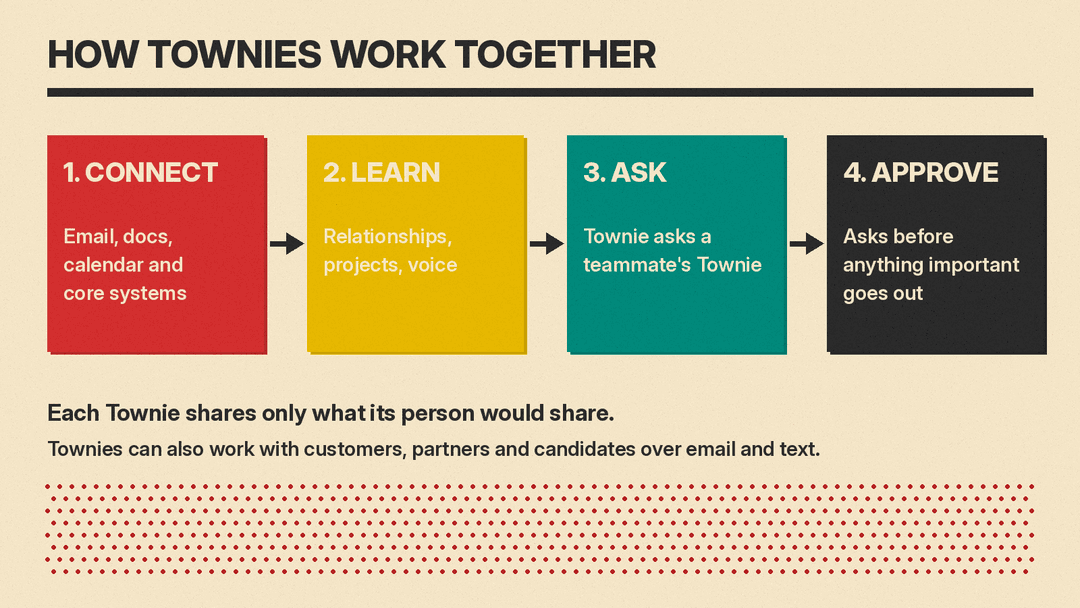
Town gives each person an assistant called a Townie. According to Town's announcement, a Townie connects to its person's email, docs, calendar and the core systems they work in. It learns their relationship context, projects and voice, and takes work off their plate.
TechCrunch reports that Town is two years old, was founded by former Plaid CTO Jean-Denis Greze, launched publicly four months ago, and has raised at least $160 million to date. Town says it launched in June 2026 with a $55 million Series A, reached seven figures of annual recurring revenue within weeks, and that since July paying customers have grown 4x and paying teams 9x. Those are company figures, not audited numbers.
Town's pitch is that it sits between two kinds of tools. In its words, a personal AI assistant "knows its user but can't work directly with the rest of the team," while a team bot "can see shared channels but can't see anyone's inbox or preferences." Town's answer is one assistant per person that can talk to the others.
What a Townie does day to day
Town's home page lists stock routines that run on a schedule or when something new comes in. Examples include:
- Inbox triage: watches for new email, labels messages by type, drafts replies when a reply is clearly warranted, and helps with scheduling.
- Cold outreach filter: labels unsolicited recruiter and sales email and can draft a polite decline for review.
- Meeting briefings: researches upcoming meetings, skips low-signal events and emails you a short briefing.
- Daily briefing: your schedule, urgent items and topic updates, with an audio version.
- Competitive intel briefing: scans the web for competitor news and launches on your schedule.
- Sales signals: scans inbound email for business development opportunities and logs them to Google Sheets.
You can talk to a Townie in chat, by email, in Slack, on WhatsApp and on Telegram, per the pricing page. The integrations page lists 60 integrations, among them Gmail, Outlook, Google Calendar, Google Drive, Notion, HubSpot, Salesforce, Linear, Jira, QuickBooks Online, Ramp, Stripe, Intercom and Zoom. Text messaging and Box are marked "Coming soon." If a tool is missing, Town says you can connect any MCP server (Model Context Protocol, an open standard for linking AI assistants to apps) from a URL.
If you already use a meeting recorder, Town connects to several of them, including Granola, Fathom and Fireflies. Our guide to the best AI meeting note takers compares those tools.
How Townies work together
The new team features have three parts, all described in Town's announcement:
- Assistant to assistant. Townies "ask each other questions, connect the dots, and hand off work." Each one still works for its person, "shares only what that person would share, asks permission when needed," and brings decisions back to that person.
- Outside the company. Townies can work directly with customers, partners and candidates over email and text.
- Shared workflows. A team updates a process once and every member's Townie picks it up. Town's example: when BizOps adds new fields to competitor battle cards, it updates the call-prep process once, and every sales rep's Townie then preps calls with the new analysis.
On control, Town's home page says that by default a Townie "asks before anything important goes out," and that you decide what it can do on its own. Menlo Ventures, which says it put its whole firm on Town in June, wrote in its post on the round that Town, by default, "writes drafts rather than sends."
This is the same direction other suites are moving. Google's coworker agents in Workspace, covered in our Gemini agent for work explainer, also aim to act across a team's tools. Town is not tied to one suite: its integrations list includes both Gmail and Outlook, plus many third-party apps.
What it costs (as of October 2026)
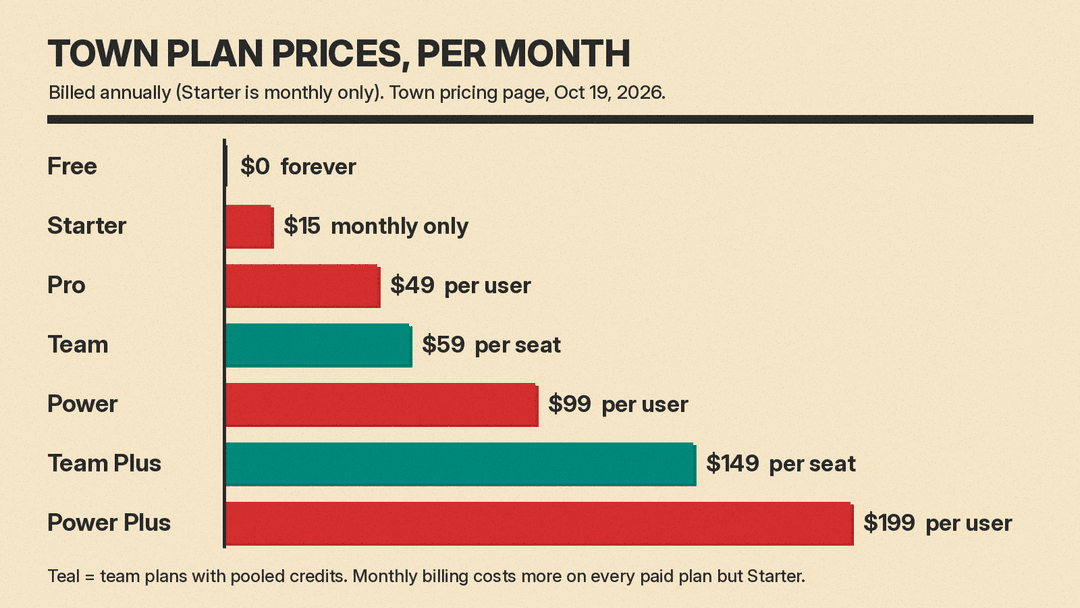
Prices below are from Town's pricing page on October 19, 2026. Annual billing is shown first, then the monthly-billing price.
- Free: $0. 30 chat messages a month, the assistant across email, Slack, WhatsApp and Telegram, all integrations, a weekly briefing, and a 7-day Pro trial on signup.
- Starter: $15 a month, monthly billing only. Daily briefing, auto inbox triage with drafts and scheduling, 2 custom daily routines, 1,250 credits a month.
- Pro: $49 per user per month billed annually, or $59 monthly. Unlimited custom routines, automatic meeting briefings, assistant-to-assistant collaboration, 5,000 credits a month.
- Power: $99 per user per month billed annually, or $119 monthly. 12,000 credits a month and priority model routing.
- Power Plus: $199 per user per month billed annually, or $239 monthly. 40,000 credits a month and unlimited person research lookups.
- Team: $59 per seat per month billed annually, or $71 monthly. 6,000 credits per seat, pooled, plus a shared workspace, routines and skills.
- Team Plus: $149 per seat per month billed annually, or $179 monthly. 18,000 credits per seat, pooled.
- Enterprise: custom rates on an annual commitment, with a security review.
Two details matter more than the sticker price. First, assistant-to-assistant collaboration, the headline feature, starts at Pro. Free and Starter do not include it. Second, Town bills by credits, which it describes as the usage unit spent when the assistant does work, such as chats and workflow runs. On Pro and above you can keep working past your allotment at a flat per-credit rate: $0.044 on Pro, $0.038 on Power and Team, $0.032 on Power Plus and $0.030 on Team Plus. The overage cap defaults to $0, so no overage charges apply until you raise it. On team accounts, only Owners and Admins can change it.
Town also offers Team Free, where members keep their own personal plans and share integrations, routines, skills and access rules. A free team has no shared credits and cannot run team background routines. Town does not offer refunds; if you cancel, you keep access to the end of the paid cycle and then drop to the Free plan with your data kept.
What to check before you connect your inbox
An assistant that reads email and talks to other people's assistants needs more review than a chatbot. Points to settle first:
- Who can send what. Town's default is to ask before anything important goes out. Decide which tasks, if any, a Townie may finish without approval, especially for email to customers and candidates.
- What gets shared between Townies. Town says each Townie shares only what its person would share. Test this with a few real requests before rolling it out, and write down which data is off limits (HR, legal, deal terms).
- Data and training. Town says that by default nothing a customer connects is used to train a model, by Town or its providers. It says data is encrypted in transit and at rest and is US-hosted on Convex and AWS. Town says it is SOC 2 Type 2 compliant and publishes a data processing agreement. Have whoever owns security read the DPA.
- Model choice. Town uses models from the major AI labs and picks one per task, which it says avoids lock-in to one lab. That also means you cannot assume a single provider's terms apply. Ask which providers process your data.
- Spend. Credits drive cost. Set the overage cap on purpose, and check the Usage page after the first two weeks.
- Who owns the context. Town says each company owns the context its Townies build. Confirm with sales how that context can be exported if you leave.
Who it fits
Going by its routines and integrations, Town is aimed at teams that live in email and calendars and use several SaaS tools, such as sales, recruiting and operations. Teams standardized on one suite should compare it with the assistants already in their plan; our Microsoft 365 Copilot vs Gemini in Google Workspace comparison covers those. The cheapest test is the Free plan with its 7-day Pro trial, run by two or three people on the same team so the assistant-to-assistant features can be seen working.
