
Claude Fable 5.2 is Anthropic's model for long, hard jobs. Its model page says it is built for "demanding reasoning and long-horizon agentic work", such as agent sessions that run for hours, multistep research, and analysis carried through to a finished document, spreadsheet, or deck. That kind of work fails in different ways than a quick chat. The agent stops halfway, goes quiet for long stretches, asks permission for routine steps, or hands you a report nobody can follow.
Anthropic has published a Fable 5.2 prompting guide that names those problems and gives sample text for each, plus a general prompting best practices page for all current Claude models. This post turns both into 10 copy-paste templates for research, coding, multistep work, and documents.
How this guide was made: every template below is built from Anthropic's published guidance, and every number comes from Anthropic's own testing as reported in its docs. We did not run these templates on Fable 5.2 for this post, so treat them as starting points and check them on your own tasks.
If you are still choosing a model, read Which Claude Model to Use first. Anthropic's launch post recommends starting most coding and knowledge tasks on Claude Opus 5.5 and moving up to Fable for "the most ambitious, open-ended technical work." Prices and benchmark scores are in our Fable 5.2 and Mythos 5.2 launch post.
Set effort before you tune the prompt
On Fable 5.2, thinking is always on and cannot be turned off. You control its depth with the effort setting, which runs from low through medium, high and xhigh to max. The default on the Claude API is high. Anthropic's guide says effort sets "how much the model thinks, how many tool calls it makes, how long a turn takes, and how many tokens it uses," so tune it alongside your prompt.
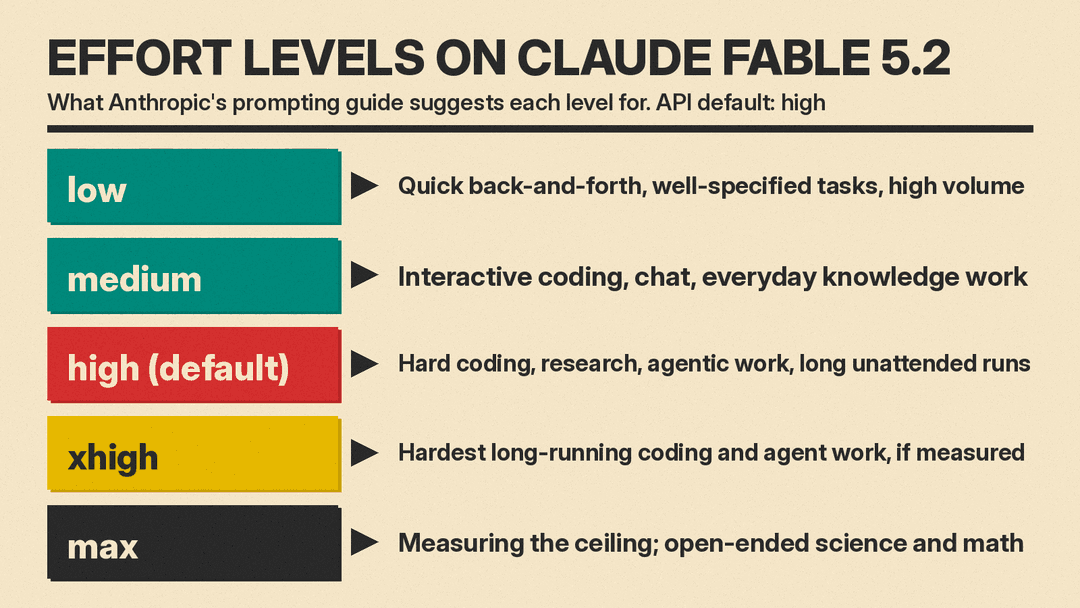
Three points from the guide matter for prompt writers:
- The model is more likely to stop early at
lowandmedium. If you run agents there, add the finishing text in template 3. - At
highand above, the model thinks before almost every reply, even a greeting. A line such as "answer directly without deliberating" did not stop it from thinking atmediumand above in Anthropic's testing. Lower the effort instead. - Effort has little effect on reply length. Use the prompt to set length and tone.
Two API notes from the model page: leave out temperature, top_p, and top_k, and do not force a tool with tool_choice set to any or tool, because that returns an error. The prompting guide adds one more: to change instructions partway through a conversation, put them in the newest turn, because editing the system prompt, tools, or an earlier message in a stored conversation can make the next request fail.
The parts of a good agent prompt
The best practices page lists habits that apply to every current Claude model, Fable 5.2 included:
- Be clear and direct. Anthropic suggests treating Claude like "a brilliant but new employee who lacks context on your norms and workflows." Its test: if a colleague with little context would be confused by your prompt, Claude will be too.
- Give the reason. Explaining why a rule matters lets Claude generalize from it.
- Use 3 to 5 examples that match your real task and cover edge cases, wrapped in tags so they do not mix with instructions.
- Use XML tags to separate instructions, context, examples, and inputs.
- Put long documents first and your question last. Anthropic says queries at the end can improve response quality by up to 30 percent in its tests, mainly with complex, multidocument inputs.
- Say what to do, not what to avoid. "Write in flowing prose paragraphs" works better than "do not use markdown."
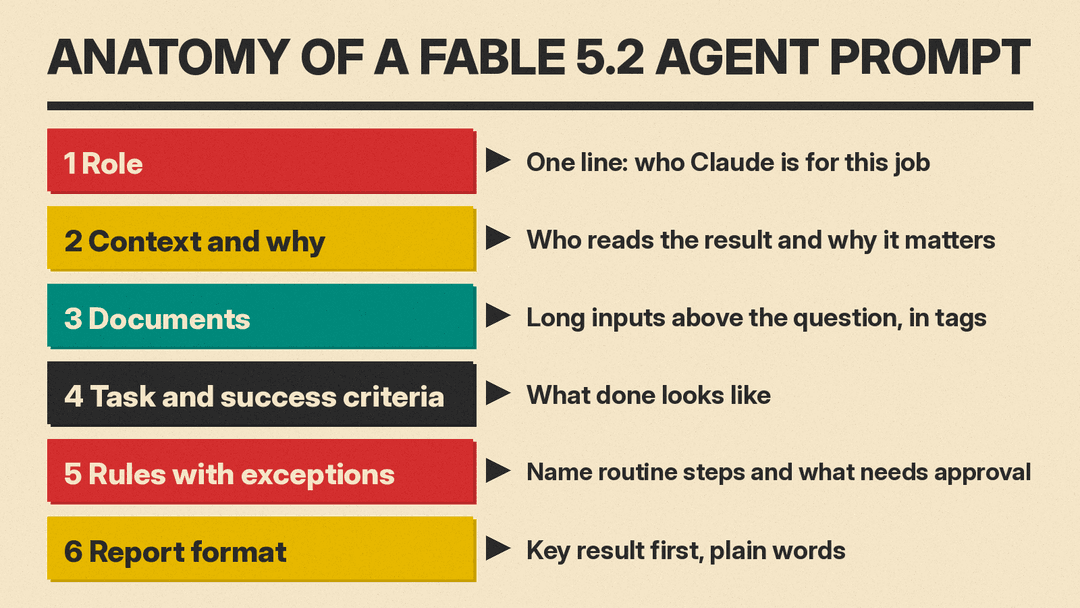
The templates below use six parts in this order: role, context and why, documents, task and success criteria, rules with exceptions, and report format. Replace anything in square brackets.
Template 1: Research brief
The best practices page says research goes better when you define what a successful answer looks like, ask Claude to check facts across several sources, and, for complex work, ask for competing hypotheses and confidence tracking.
You are a research analyst. I need this for [who will read it and why].

<task>
Answer this question: [your question].
A good answer: [what success looks like, for example "names the 5 largest
vendors with a cited source for each figure"].
</task>

<method>
Search in a structured way. As you gather data, keep several competing
explanations and track your confidence in each in a notes file. Check every
key fact against at least two independent sources. If sources disagree,
report both and say which you trust more and why.
</method>

<output>
Start with a 3-sentence answer. Then give the evidence, with a link next to
each claim. End with what you could not confirm.
</output>
Template 2: Analysis of long documents
Per the long-context advice, documents go first in their own tags and the question goes last.
<documents>
  <document index="1">
    <source>[file name]</source>
    <document_content>
[paste document 1]
    </document_content>
  </document>
  <document index="2">
    <source>[file name]</source>
    <document_content>
[paste document 2]
    </document_content>
  </document>
</documents>

Using only the documents above, [your question]. Quote the passage that
supports each point and name the document it came from. If the documents do
not answer part of the question, say so.
Template 3: Finish the whole task
Anthropic's guide says Fable 5.2 "sometimes ends a turn before the work is done," often by listing what is left, offering to continue, or stopping at an ordinary obstacle like a timeout. The guide gives a longer sample block. This is a shorter version built on the same points:
# Finishing work
Keep working until the task I asked for is done. Status notes are welcome.
If you need my answer on an open decision, ask, and carry on with any work
that does not depend on it.

Treat ordinary obstacles (errors, timeouts, locked files, empty results,
failing tools) as problems to diagnose and work through: wait and retry, fix
the request, or use another tool or source.

If something is a deliberate blocker, such as a file marked not to be
touched, access that was withheld on purpose, or a safety guardrail, leave
it alone, say what you found, and look for another safe way to finish. This
does not replace asking me before risky or destructive actions.
In Anthropic's replay of coding sessions at medium, a version of its text cut sessions with unfinished work by about half, and output tokens rose by about 30 percent. Because the model asks less often with this text, keep your own confirmation step for risky actions.
Template 4: Coding when the code base is yours to redesign
The guide says Fable 5.2 "pays close attention to who owns the code it works on." When the prompt said nothing, the model tended to add to the existing structure, even if that duplicated code. Anthropic's suggested sentence:
You are the owner and long-term maintainer of this codebase, and its design
is up to you.

Task: [what to build or fix].
Write a general solution using the standard tools available. It must work
for all valid inputs, not only the test cases. Do not hard-code values to
make tests pass. If a test looks wrong, tell me instead of working around it.
In Anthropic's small coding tests, the model merged duplicated code in under 10 percent of runs without the ownership sentence and about 75 percent with it. The cost: output tokens rose about 70 to 80 percent, and the model made changes nobody asked for, sometimes including changes to how an existing feature behaves. Review the diff, not only the summary.
Template 5: Coding when you want small changes
If the user owns the code and wants it changed as little as possible, leave the ownership sentence out. Anthropic found that a scope rule does not cancel it: with "No drive-by refactors, renames or cleanups" earlier in the same prompt, the model still merged duplicated code in more than half of runs. So for small fixes, do not add ownership language at all:
This code belongs to my team. Make the smallest change that fixes [bug].

Read the files involved before you answer. Do not guess about code you have
not opened. When you are done, list every file you changed and every change
you made, including small ones.
The last line asks for a full list because the guide notes that a closing summary from Fable 5.2 "often left out small changes."
Template 6: Progress updates during long runs
During long runs of tool calls, Fable 5.2 sometimes writes little for the user, and its updates come back in a form some apps do not show. If a person is watching, Anthropic suggests this text:
Before you start, say in a line what you're about to do; brief updates while
you work help the user follow along. Close with a short recap that stands on
its own (what you found, what you did, and what's next), so a reader who
only sees the last message has the full picture.
With this text, the model wrote a message before its first tool call in every run of Anthropic's coding tasks, and output tokens rose about 20 percent. If you cannot change your app, the guide offers one simpler sentence: "Every few tool calls, give the user a one-line update on where things stand." For unattended work where nobody needs updates, you can skip both.
Template 7: Approvals that do not stall the agent
The guide says Fable 5.2 treats any instruction containing "never" as absolute. Vague caution can make it hold routine work. In one Anthropic test, listing "sending messages to people outside this conversation" as needing approval led the model to hold back about half of its routine requests to colleagues. So name the routine steps, and write rules with their exceptions:
You can do these without asking: [read files in this folder, run the test
suite, edit files on your branch, search the web].

Ask me before: [deleting files or branches, pushing code, sending email to
anyone outside the team, changing shared settings]. Ask for approval before
deleting files rather than refusing to delete them.

Prefer local, reversible actions. Do not bypass safety checks to get around
an obstacle.
When you approve something mid-task, be exact. The guide suggests replying "Yes, run the migration on the staging database" instead of "go" or a thumbs-up.
Template 8: When to use subagents
Anthropic's launch post says Fable 5.2 can act as an orchestrator that hands simpler tasks to smaller models. The prompting guide warns that subagents "can account for a large part of what a session costs" and advises changing your setup only if the model starts more subagents than the task needs. If it does, the best practices page offers this guidance, and the Fable guide adds that your description should say what a subagent costs and how to brief one:
Use subagents when tasks can run in parallel, require isolated context, or
involve independent workstreams that don't need to share state. For simple
tasks, sequential operations, single-file edits, or tasks where you need to
maintain context across steps, work directly rather than delegating.

Each subagent adds [cost or time in your setup]. When you start one, give
it the goal, the files it needs, and the exact output you want back.
Template 9: Work that spans several sessions
For jobs too long for one context window, the best practices page suggests saving state to files: a structured file for test or task status, a plain-text progress log, and git for checkpoints. A fresh session can then rebuild context from those files.
This is a long task that will continue across sessions.

At the start of each session: run pwd, then read progress.txt, tests.json
and the recent git log before doing anything else.

While you work: keep task status in tests.json, write short progress notes
in progress.txt, and commit after each finished step. Do not remove or edit
tests to make them pass. Before a session ends, make sure nothing important
is left uncommitted.
Template 10: Final reports and handoffs
After a long run, the reader has not seen the tool calls or files behind the report. Anthropic's guide offers a longer sample block that asks for self-contained messages written for "an intelligent but low-context reader." This is a shorter version of the same ideas:
Write the final report for [audience], who has not seen your work.
Put the key result in the first few sentences. Use plain words and full
sentences, and do not use terms you made up during the work. Use prose where
ideas connect and bullets only for separate items. End with open questions
and what you would do next. Keep it under [length].
In Anthropic's testing, its version made final reports less dense and shortened sentences on workflow tasks. The guide also warns that Fable 5.2 follows style rules closely, so a hard limit like "20 words or fewer" per sentence can make its writing choppy.
What to remove from prompts written for older models
The Fable 5.2 guide lists lines that worked on earlier models but now raise cost or backfire. Check your system prompt, agent files, and memory notes for these:
- Standing orders to delegate. Remove them if the model delegates too much in testing.
- A token budget shown in the prompt. In Anthropic's coding tests at
highandxhigh, removing a large budget lowered cost with equivalent performance. - "Answer directly without deliberating." It no longer stops thinking at
mediumand above. Lower the effort instead. - Strict style rules you no longer need. The model follows them closely.
- Old cautions in memory and notes. Delete ones whose reason no longer holds, and rewrite absolute rules with their scope and reason.
- Requests to write out reasoning in the reply. These can trigger a refusal. To see how the model reasoned, the guide points to summarized thinking blocks instead.
Where to start
Anthropic's guide ends with a short order of work:
- Set effort to
highexplicitly, then also testmediumandxhigh. - Read the prompts, agent files, and notes you are carrying over, and remove the lines listed above.
- Run your longest agent tasks and note where the model stops early, asks for approvals it does not need, goes quiet, delegates too much, or adds to code you wanted restructured.
- Add one fix at a time and measure its effect and token cost.
Several of the fixes above cost 20 to 80 percent more output tokens in Anthropic's tests, so add only the ones your tasks need. For more on structuring prompts, see our guide to XML tags in prompts.
