
Anthropic has added an experimental Code Mode to Claude Code, its coding agent. In Code Mode, Claude stops asking for one tool call at a time and instead writes a short JavaScript program that makes several tool calls in one step. Claude Code then runs that program in your session. The feature is off by default, and the Code Mode documentation warns that it "may change or be removed in any release."
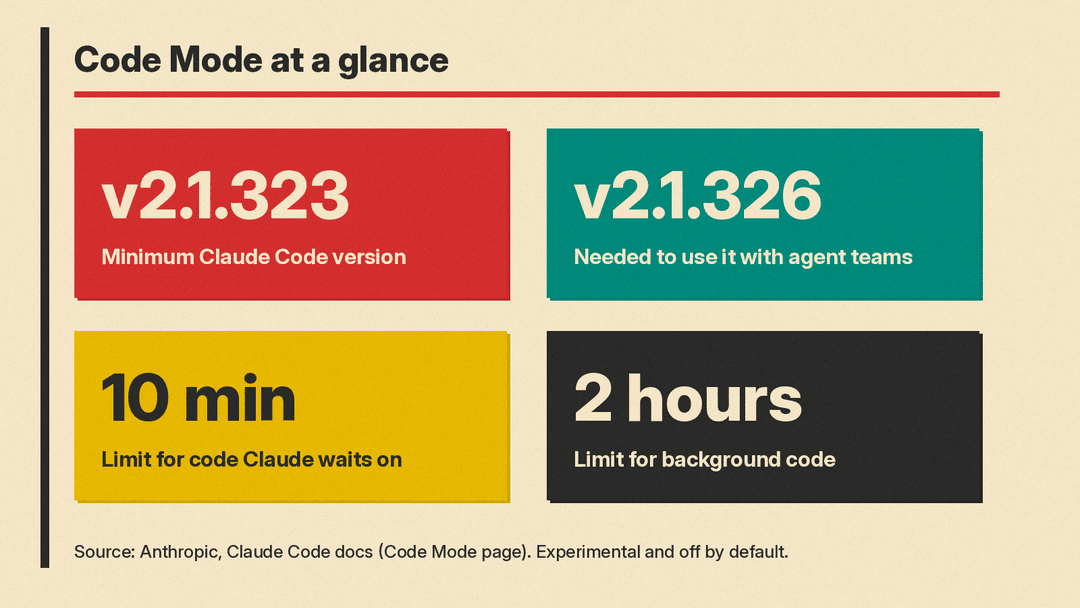
Code Mode first shipped in Claude Code v2.1.323 on November 12, according to the Claude Code changelog. Version 2.1.326, released November 16, added support for using it with agent teams. MarkTechPost covered the launch on November 17.
What Code Mode changes
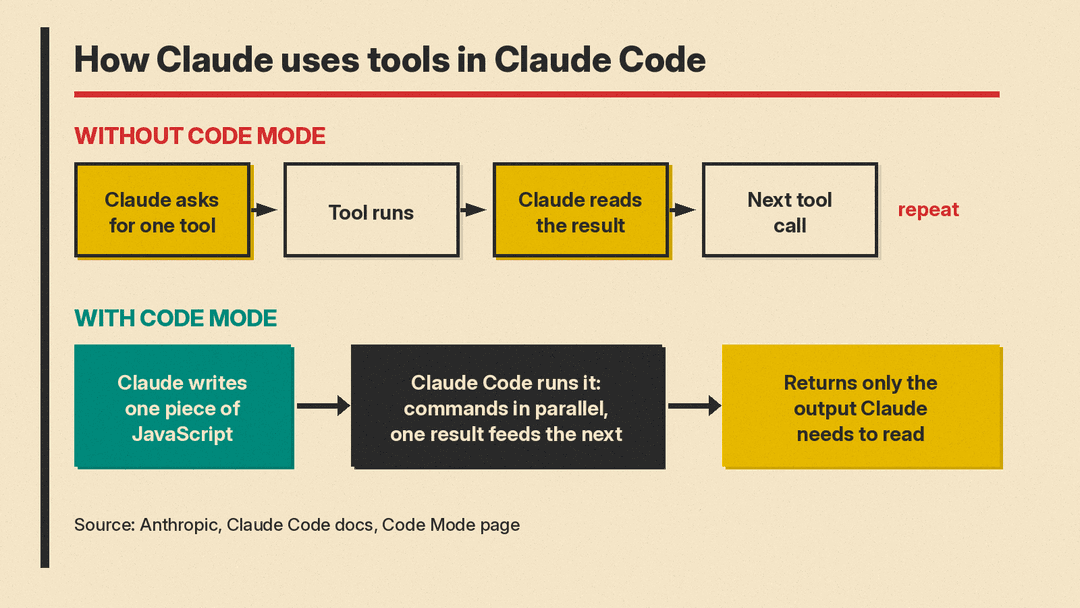
Normally, Claude Code works in a loop. Claude asks for a tool such as Bash, Read or Edit, reads the full result, and then decides on the next call. On a task that touches many files, that means many separate round trips, each with a result for Claude to read.
In Code Mode, Claude writes code that does the calls for it. Anthropic's documentation says one piece of code can run commands in parallel, feed one result into the next call, and return only the part of the output that Claude needs to read.
The docs give an example for raising a retry limit. Claude writes code that searches the source folder for the right file, edits the value from 3 to 5, runs the matching tests, and hands back just the file path and the test output.
You still see the tool calls in the conversation, such as an edit's diff, but not the code itself. Pressing Ctrl+O opens the transcript viewer, where each program appears as a collapsed Code row you can expand.
When Anthropic suggests using it
The documentation recommends Code Mode for tasks that take many related tool calls:
- A change that repeats across many files
- A search whose results need filtering before Claude reads them
- Several independent commands that can run at the same time
MarkTechPost reports that Anthropic publishes no benchmark or token savings figure for Code Mode, and the documentation does not give one.
How to turn it on
Code Mode needs Claude Code v2.1.323 or later, a Claude subscription or Console account, and one of four models: Claude Opus 5.5, Sonnet 5.5, Haiku 5.5 or Fable 5.2. Per the requirements list, it runs only in an interactive claude session in a terminal on the native build. Windows users need Git for Windows.
To try it, set the CLAUDE_CODE_EXPERIMENTAL_CODE_MODE environment variable to 1 when you start Claude Code, or add it to the env block in ~/.claude/settings.json. Claude Code asks you to confirm before the first session, then restarts with a line saying Code Mode is on. The docs say Claude Code ignores the variable in a project's own settings files, "so a repository you clone can't turn on Code Mode for you."
A Code Mode session can be resumed only with the variable still set to 1. Setting it to 0 in either your shell or your user settings keeps Code Mode off. Administrators can block it for a whole organization by setting the variable to 0 in managed settings, but they cannot switch it on for users.
What it does not work with
The list of exclusions is long for now. According to the documentation, Code Mode does not work:
- Through a gateway, Amazon Bedrock, Claude Platform on AWS, Google Cloud's Agent Platform, Microsoft Foundry, or Claude Models on Google Cloud (Anthropic managed)
- In organizations that use the HIPAA configuration or zero data retention
- With
-p, the Agent SDK, the VS Code panel, the Desktop app, or cloud sessions - With Remote Control, Claude in Chrome, or computer use
- With some settings on, such as an API key helper, OpenTelemetry export or
DISABLE_TELEMETRY
Permissions and time limits
Every tool call inside Claude's code still passes through your deny and ask permission rules and your PreToolUse hooks, under the tool's usual name. The documentation flags one change for auto mode users: auto mode's classifier reviews each piece of code before it runs, not each tool call, and it "doesn't see values computed at run time, such as a path taken from search output." Anthropic advises keeping rules or hooks for any calls you must control. In other permission modes, code starts without a review and you are prompted for each tool call as usual.
Hook authors get specific guidance. A git push in a folder named app can reach a hook as cd 'app' && git push, so hooks should check each part of a command. To inspect the program itself, a hook can match the REPL tool and read the JavaScript from tool_input.code.
Time limits depend on how the code runs. If Claude waits for the code, it stops after ten minutes, including time spent at permission prompts. Code that runs in the background can last up to two hours while you keep talking to Claude, but that requires a session started in auto or bypassPermissions mode.
Why it matters
The idea of letting a model write code to call tools is not new. Anthropic's November 2025 engineering post on code execution with MCP described an example where loading only the tool definitions an agent needed cut token use "from 150,000 tokens to 2,000 tokens," a 98.7% saving, and noted that Cloudflare called the approach "Code Mode." Later that month, Anthropic's advanced tool use post said its Programmatic Tool Calling API feature cut average usage from 43,588 to 27,297 tokens, a 37% reduction on complex research tasks.
As MarkTechPost puts it, Claude Code's version applies the pattern to the CLI's own tools. For people who already let Claude Code run long jobs, the change shifts some review from single commands to whole programs, which is why the auto mode caveat matters. For more on how Claude Code asks before acting, see our guides to Claude Code auto mode and deny rules, AI agent permissions, and the Claude Code slash commands cheat sheet.
The feature is still experimental. Anthropic asks users to share feedback with the /feedback command.
