
Most AI video tools take a prompt and hand back a finished clip. Runway's GWM Worlds 2 does something else: it keeps generating, and it changes what it shows as you steer it. Runway shared the model as new research on September 3, 2026, and calls it a research preview. According to Runway's research post, it generates continuous 720p video at 24 frames per second with audio at 48,000 Hz, and it responds to your inputs as you explore.
This explainer covers what GWM Worlds 2 is, how its WorldPrompt input format works, how Runway made it run in real time, what the demo can do, and the limits Runway lists itself. Everything below comes from Runway's own post and launch video unless we say otherwise. No independent benchmark of the model has been published.
GWM Worlds 2 at a glance
- What it is: a "General World Model" from Runway that generates interactive environments in real time, with sound.
- Output: continuous 720p video at 24 fps and audio at 48,000 Hz.
- Controls: free-form text actions addressed to any character or to the scene, plus continuous camera motion.
- Length: sessions have no preset length. The world continues from each new input "instead of following a fixed clip or script."
- Status: a research preview. Runway's post describes a demo, but it does not say how or when the public can use the model, and it lists no price or API.
- Uses Runway names: interactive entertainment, virtual characters, robotics and embodied-agent simulation, and generative design and interfaces.
From GWM Worlds to GWM Worlds 2
Runway showed the first GWM Worlds last December as a world model for real-time environment simulation. Runway says that version "excelled at maintaining spatial consistency across long sequences of movement," meaning a space held together as the camera moved through it for a long time.
GWM Worlds 2 is the next step. Runway says it is built on top of its foundational audio-video generation model, and it adds two things the first version did not have: generated audio, and rich control over the subjects and the scene. You define the environment, the subjects, the visual style, the physical rules and the ambience. Then you play.
A text action can be almost anything you can describe. Runway's examples include a sword slash, a spoken reply, a room flooding with water and a dust storm rolling in.
WorldPrompt: what stays and what changes
The core idea in GWM Worlds 2 is an input format Runway calls WorldPrompt. It splits a world into two kinds of state: what persists and what changes over time.
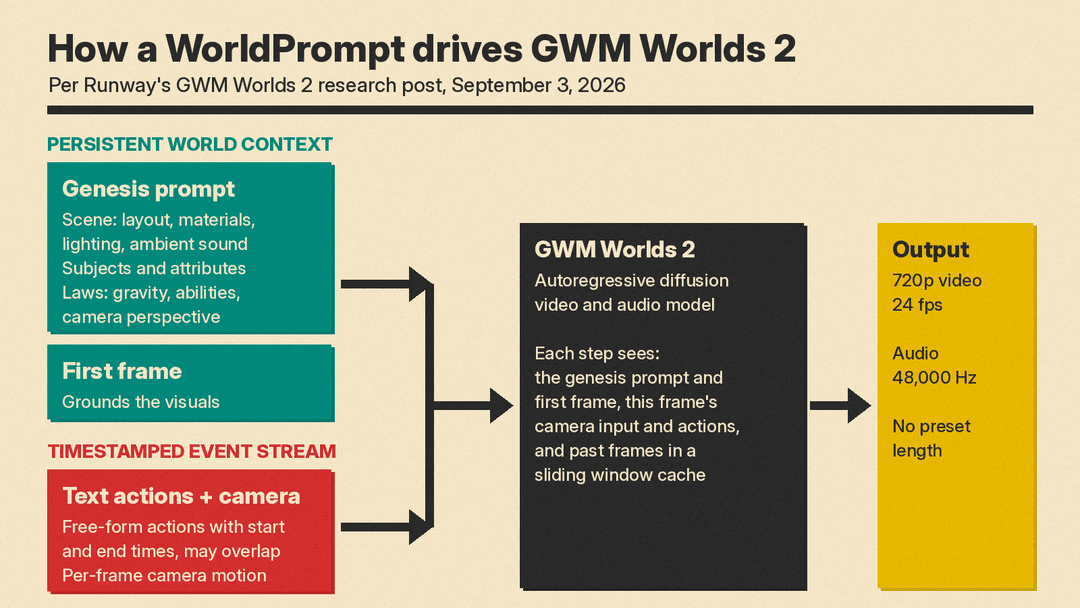
The persistent layer has two parts:
- A genesis prompt. This holds a scene description (the environment, its layout, materials, lighting and ambient sound), the subjects that can take part in events along with their attributes, and the laws. Laws are reusable conventions that govern behavior, from gravity and collision to character abilities and the camera perspective.
- A first frame, which grounds the generation visually.
The changing layer is a timestamped event stream:
- Actions describe movement, gestures, object interactions, speech and sound. Each action is a free-form text prompt with a start and an end time, addressed to a subject or to the scene itself. Actions can overlap.
- Camera input is a per-frame stream of viewpoint translation and rotation.
Runway's worked example is a street-corner chat. The scene is a wet urban pavement with brick buildings and yellow autumn leaves. The subjects are a street sweeper in an orange high-visibility vest and a woman in a green trench coat, each with a voice. The law says gravity behaves like Earth and the camera follows the woman in third person. The event stream then schedules lines of speech and actions over about 15 seconds: the sweeper sweeps leaves, points forward and says "Just head straight down," while the woman says "Excuse me" and then starts a line of thanks. Runway notes that actions can overlap freely.
The point of the split is that speech is just another action. A line of dialogue sits on the same timeline as a gesture or a weather change, which is what lets one prompt format cover games, film scenes and simulations.
How Runway made it real-time
Runway describes the build in two stages.
First, it took its foundational audio-video model and fine-tuned it on the WorldPrompt format. Runway shows clips where this fine-tuned model follows the WorldPrompt structure, such as a lakeside conversation between a traveler and a fisherman.
That fine-tuned model was still too slow, and it could not generate step by step because it is bidirectional, meaning it looks at the whole clip at once. So Runway post-trained it into a real-time autoregressive model, which generates one step after another. That model is GWM Worlds 2. Runway says that, unlike the bidirectional version, it is not restricted to a fixed duration and "can generate indefinitely."
Runway's model overview gives a few more details:
- GWM Worlds 2 is an autoregressive diffusion model for video and audio.
- Each step is conditioned on three kinds of context: a global context (the genesis prompt and the first frame), the current frame's inputs (camera input and the text actions that span that frame), and past generated frames held in a sliding window.
- Every token attends to the global tokens. Each frame's video, text and audio tokens attend to themselves and to past frames in a sliding KV-cache window, and older frames are evicted.
- The video and audio decoders are causal and run with a cache for faster decoding.
The sliding window is a practical trade. It keeps the cost of each step bounded during a long session, and the genesis prompt and first frame stay in view the whole time. It also helps explain one of the limits below: older frames drop out of the window.
What you can do inside a world
Runway's clips and launch video show a set of controls that are closer to a game than to a video editor.
- Navigation: first-person and third-person movement such as walking, driving and riding. The camera and the subject can be controlled separately.
- Actions: movement like running, climbing and leaping; object interactions like switching a lamp on or changing its color; and scene events like a theater stage erupting in fire.
- Directing the scene: in one desert example, prompts addressed to the campfire and the weather flare the fire and fade the sunset into a starry night, while a player moves a survivor around.
- Dialogue: characters can hold conversations, and you can control the voice, tone and language of the speech. Runway says lip movement and delivery are generated to match.
- Key bindings: recurring actions can be bound to keys for fast play.
- Starting from a video: instead of an image, you can prefill a session with an existing video. In Runway's example, an eight-second generated clip is used as the start, and the model keeps the environment and audio consistent with it as play continues.
- Agents at the controls: Runway let an agent drive both a character and the environment. In a simple test, a humanoid robot that could only move forward, backward, left and right was told to reach a red flag or a blue flag. Runway says the agent succeeded on its first try in both cases, and also succeeded when told to reach red and then blue.
- Multiplayer: the demo has roles, such as player 1, player 2 and director, each with its own actions. Runway says the demo uses LiveKit to broadcast the video and audio to everyone, and each client can pick a different role.
- World authoring: sessions start from presets that hold the first frame, the genesis prompt and the actions bound to keys. An LLM can generate a preset from a short line. Runway's example is "third person perspective dirt bike in a snowy landscape," and it says this goes from an idea to a world "within seconds."
The agent and flag test matters more than it looks. If an agent can act inside a generated world and reach a goal, the world becomes a place to test and train agents, which is the robotics and embodied-agent use Runway names. Runway's test is small and self-reported, so treat it as a demo rather than evidence.
Three ways to use the model
Runway lists three ways it imagines the model being used, and it is open about which one works best today.
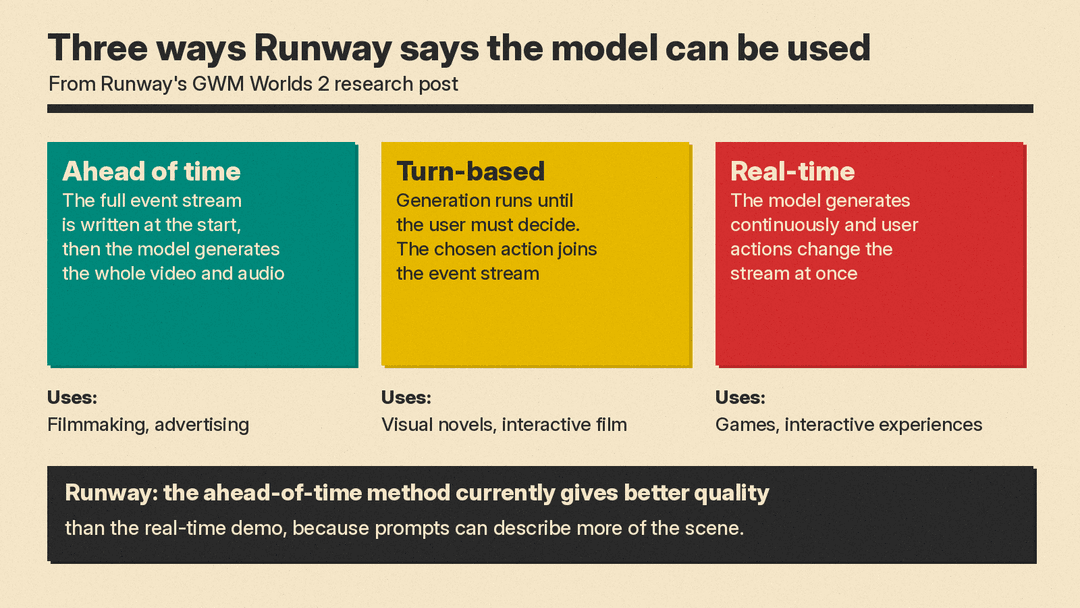
- Ahead of time. The user, possibly with help from an LLM, writes the whole timestamped event stream at the start, and the model generates the full video and audio from it. Uses: filmmaking and advertising.
- Turn-based. Generation runs until the user has to make a decision. The user picks an action, which an LLM could convert into the event stream format, and generation continues to the next decision point. Uses: visual novels and interactive film.
- Real-time. The model generates continuously and user actions affect the stream immediately. Runway calls this "the most challenging scenario." Typing actions would be too slow, and Runway says even vision language models "cannot react within tens of milliseconds." Uses: games and interactive experiences.
Runway's real-time demo works around the typing problem by binding keys and mouse inputs to premade prompts. For example, the W key might mean "The character moves forward." Some of the clips in the post were made with the ahead-of-time method instead.
The most useful line for creators is this one: Runway says the ahead-of-time method "currently" produces better quality than the real-time demo, because the text prompts can describe much more of the scene. When you turn around in the real-time demo, the model has to invent everything that comes into view, with only the persistent context and previous frames as anchors.
For filmmakers, that means the strongest current use looks like scripted generation with a timeline, not a live game. For game makers, it means real-time play works but with lower fidelity.
Limitations Runway lists
Runway's post includes a plain limitations section:
- It is a research preview, and real-time generation still trades fidelity for speed.
- Difficult camera inputs, such as very quick rotations, can make details, textures and geometry degrade.
- Long-term memory is imperfect.
- The model does not support image references beyond the first frame or prefilled video and audio.
- Getting full value from free-form text control can require an external real-time harness that tracks the state of the world and generates actions on the fly, for example to run NPC dialogue in an NPC and player conversation.
Runway also says real-time video generation "is still in its earliest stages" and that it expects these constraints to be solved with more research. Its view is that the same curve that took offline video generation from short, rough clips to production footage will play out again, with GWM Worlds 1 and 2 as two early points on it. That is a forecast from the company, not a result.
Coverage from AI Insiders adds a useful caution: all of the figures come from Runway's own research post, and Runway has not published independent benchmark results or third-party evaluations of latency, frame quality, or how the model holds up over long sessions.
How it compares with other world models we have covered
GWM Worlds 2 is one of several recent attempts to move AI video from clips to worlds, and they take different routes.
- VAST EdenLive is an open-source real-time AI video renderer aimed at games and interactive worlds. You can download it, while GWM Worlds 2 has no public release described in Runway's post.
- Viggle JST-2 builds scenes, characters and motion as persistent 3D atoms instead of pixels. GWM Worlds 2 stays in video: it generates frames and audio step by step from text actions and camera input.
If you want a tool that makes a finished clip today, a world model is the wrong place to start. Our guide to the best AI video generators covers Runway Gen-4.5, Kling 4.0, Seedance 2.5, Veo and others.
What to watch
- Access. Runway's post describes a demo but no product, price or API. Any public release would be the next real news.
- Independent tests. Latency, image quality over long sessions and memory are the open questions, and so far only Runway's own clips answer them.
- Real-time quality. Runway says the ahead-of-time method looks better today. The gap between that and live play is the number to track.
- Agent use. The flag test is a start. Larger agent evaluations inside generated worlds would show whether the robotics and simulation pitch holds up.
