
Alibaba's Qwen Office released version 2.0 on Nov 9, 2026. The update puts an AI agent inside team group chats, adds event triggered automatic tasks, and lets people and AI edit the same documents together.
What is Qwen Office 2.0?
Qwen Office (千问办公, literally "Qwen Office") is Alibaba's AI desktop assistant (its Aug 24, 2026 launch notes say it is for everyone), with documentation at docs.qwenwork.cn. Version 2.0 shipped on Nov 9, 2026, according to the official desktop release notes and IT Home, which cited DingTalk's announcement.
IT Home and PingWest describe 2.0 as a "Team Agent"; IT Home and Guandian add that it is aimed at collaboration by individuals and organizations. PingWest and Guandian call it the largest upgrade in the three months since the product launched. The first release notes entry is dated Aug 24, 2026. IT Home says all the new features are fully live in the Qwen Office client.
Before 2.0, the product already handled natural language tasks with a choice of models, local file processing, and generation of Word, Excel, PPT and PDF files, per the August release notes. It could build and deploy web pages, operate the browser and desktop, use skills and connectors, and connect to DingTalk calendar, docs, contacts and approvals. PingWest says it had already made initial connections to the IM apps DingTalk, Feishu and WeCom. Clients cover macOS 14 and later, Windows 10 and later, and HarmonyOS 6.1 and later.
What can the agent do in a team space?
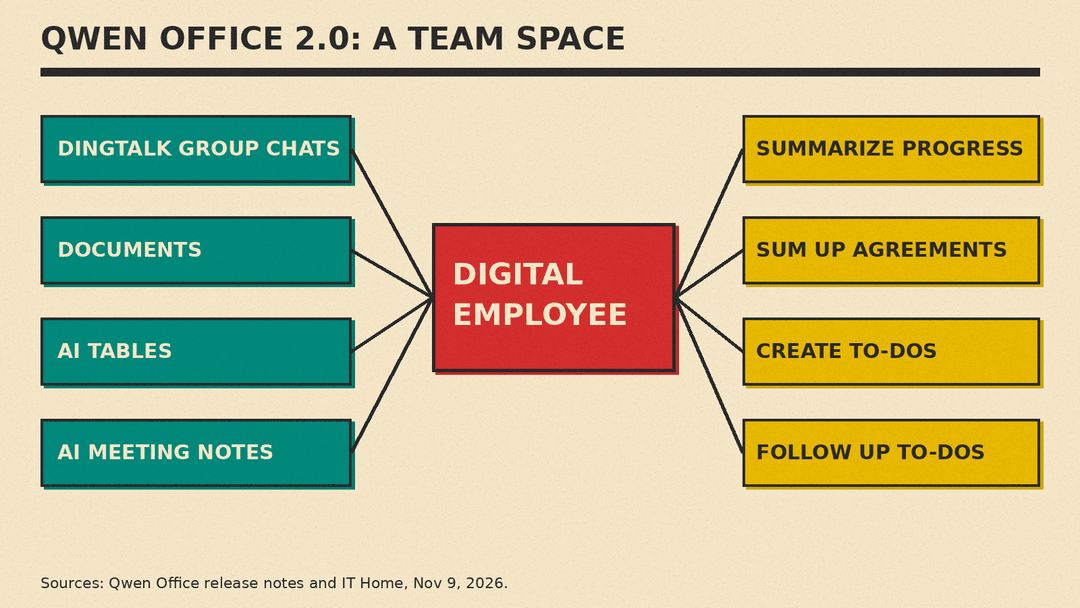
The headline feature is collaboration (协作). Users create a collaboration space where a team and a "digital employee" (数字员工) work together. The release notes say each space gets its own dedicated digital employee. Members discuss in native IM and hand off work, and the digital employee uses the space's materials, discussions and confirmed agreements to push the project forward and arrange to-dos.
IT Home reports the agent can link multiple DingTalk group chats, documents, AI tables and AI meeting notes (AI听记) in real time, run multiple sessions in parallel, and handle task management and assignment. It can summarize progress, sum up agreements, and create and follow up on to-dos. It is called the industry's first feature for several people and an agent to collaborate by PingWest and Caijing.
Guandian reported one customer example. At Intime department stores (银泰百货), the coupon operations team had five staff collecting coupon submissions across more than 60 store group chats one by one, then filling in a spreadsheet. Now the store groups and one AI table are linked into a single space, and the agent summarizes across the groups and updates the table automatically.
What are automatic tasks and trigger tasks?
The old "scheduled tasks" entry is now called "automatic tasks" (自动任务). It holds time driven scheduled tasks plus new trigger tasks that run on events. The release notes list three categories of trigger events: messages, approvals and to-dos. Tasks can run on a cloud computer or on "this computer."
One release notes example: when the boss messages you to assign work, the agent automatically logs a DingTalk to-do. IT Home says the initial supported triggers include messages from a specified person, messages that @-mention you in a specified group, and approval tasks. PingWest gives another example: a regional manager sets a rule that if someone in the group @s them about a stock shortage, the agent reads the inventory sheet and files a transfer request.
How does human-AI co-creation work?
The co-creation feature (人机共创) opens DingTalk docs, AI tables and Yida apps (宜搭, DingTalk's low-code app builder) inside the task chat. You can edit the file yourself and then let the AI continue, or select text, cells, slides or app areas and tell the AI how to change them. IT Home says several comments can be marked and submitted at once, and the AI edits the original document. For online docs, AI tables and Yida apps, multiple people and multiple agents can co-edit at the same time. The release notes say edits keep the document's existing permissions.
What is the materials space?
The materials space (资料空间) collects files Qwen Office generated, files you uploaded, and DingTalk docs, AI tables and Yida apps used in Qwen Office. You can find items by type or file name, see the conversation they came from, and add materials to a new task. Ordinary files are shared through the materials space, while online docs keep their own permissions, the release notes say.
Do tasks keep running when the computer is off?
PingWest says phone, computer and web sync tasks, conversations and outputs in real time, and that tasks run in the cloud and continue after the computer is shut down. The release notes also describe a new mobile app. With remote control turned on, a phone logged into the same account organization can control a chosen computer's Qwen Office, including local apps, computer use and browser use. Permission requests during a task can be handled from the phone. Voice input was upgraded too, with faster near-real-time transcription and better accuracy that uses conversation context and industry terms to distinguish homophones.
Why does this update matter?
The release notes describe collaboration as moving Qwen Office from "one person chatting with AI" to "a team and AI working together in the same space." In practice, 2.0 moves the agent into the group chats where work is actually assigned, and event triggers let it act without anyone typing a prompt. That raises practical questions for teams about permissions and review. The release notes address one piece of this by stating that online docs keep their existing permissions, but who checks an agent's output before it acts is a question each team will need to answer.
Alibaba's Qwen model family is covered in our explainer What Is Qwen? Alibaba's AI Models Explained, and Qwen recently appeared in Apple Intelligence China Beta Starts With Alibaba Qwen. For ByteDance's competing assistant, see What Is Doubao?
Sources
- Qwen Office desktop release notes (Nov 9, 2026 and Aug 24, 2026 entries)
- IT Home: Alibaba Qwen Office 2.0 released, citing DingTalk (Nov 9, 2026)
- PingWest: Qwen Office 2.0 released (Nov 9, 2026)
- Guandian: Qwen Office releases version 2.0 (Nov 9, 2026)
- Caijing: Qwen Office 2.0 released (Nov 9, 2026)
- DingTalk Yida (宜搭) low-code platform home page
