
Epic Games' Claude Code plugin for Unreal Engine went viral this weekend. A post from @RoundtableSpace on October 18 (UTC) said Epic "released an official plugin that lets Claude Code control Unreal Engine directly." By Monday morning it had about 294,000 views and nearly 5,000 likes, and posts about it were spreading in Japanese, Chinese, French and Portuguese.
The plugin is real and it is made by Epic. But it is not new, and it is not the part that does the work. The engine feature underneath it shipped with Unreal Engine 5.8 in June, and it works with other coding agents too. This explainer covers what the plugin is, how to set it up, what it can touch in your project, and the security warnings Epic puts in its own README.
The short version
- What it is: unreal-engine-skills-for-claude-code, an MIT-licensed Claude Code plugin from Epic Games. It holds one skill (
unreal-mcp) and one session hook. - What does the work: Unreal MCP, an Experimental plugin in Unreal Engine 5.8 that runs an MCP server inside the editor. MCP (Model Context Protocol) is the open standard that lets an AI agent call outside tools.
- What it can touch: per the README, "hundreds of tools" across "30+ toolsets," including actors, Blueprints, materials, Niagara, Control Rigs, Sequencer, State Trees, widgets, the Gameplay Ability System and automation tests.
- Who can use it: anyone on Unreal Engine 5.8 with Claude Code. The same editor server also generates configs for Cursor, VS Code, Gemini and Codex.
- What it costs: the plugin is free and MIT licensed.
Why the viral posts got the date wrong
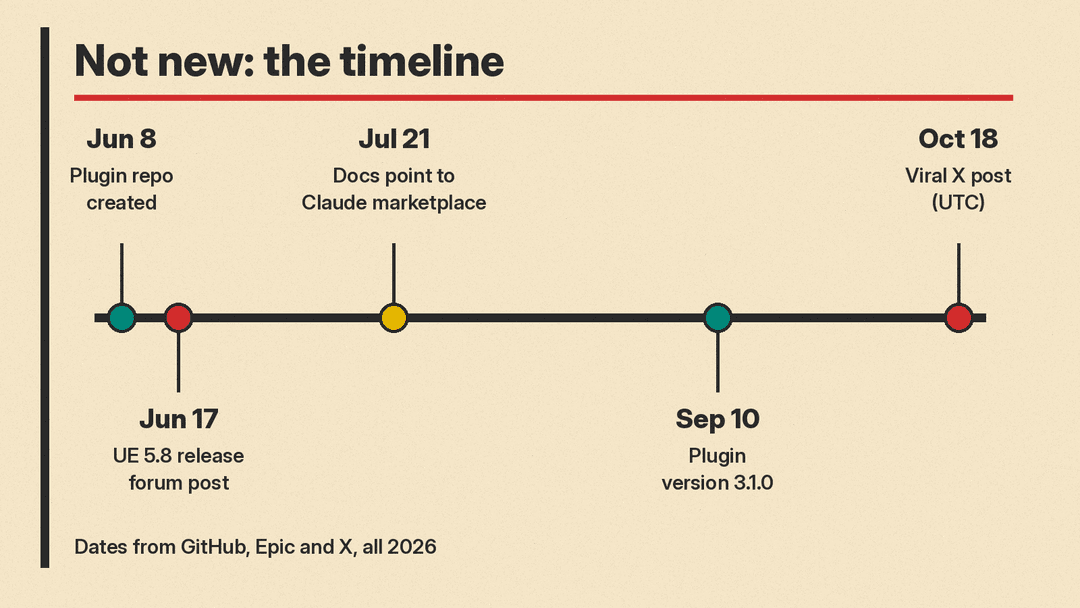
GitHub's API shows the repository was created on June 8, 2026. A July 21 commit changed the install docs to point at Anthropic's official plugin marketplace, and version 3.1.0 landed on September 10. The latest commit, on September 17, is titled "Permit safe concurrent tool calls." As of October 19 the repo has more than 1,250 stars and 122 forks, and the Claude marketplace listing shows 871 installs.
Some users noticed. "It's not new. The repo dates to June, and its docs pointed to Anthropic's official plugin marketplace in July," wrote @webtkdev on Monday.
The engine side is older news too. Epic's forum announcement that Unreal Engine 5.8 was released is dated June 17, and Epic's 5.8 announcement describes an Experimental MCP plugin that lets LLM systems ("you can use any model you want") connect to the engine and your project. The same announcement says 5.8 is the last planned major Unreal Engine 5 release as Epic works on UE6.
So the weekend's news was a discovery moment, not a launch. That still matters: most game developers had not heard of it, and the setup is now easy.
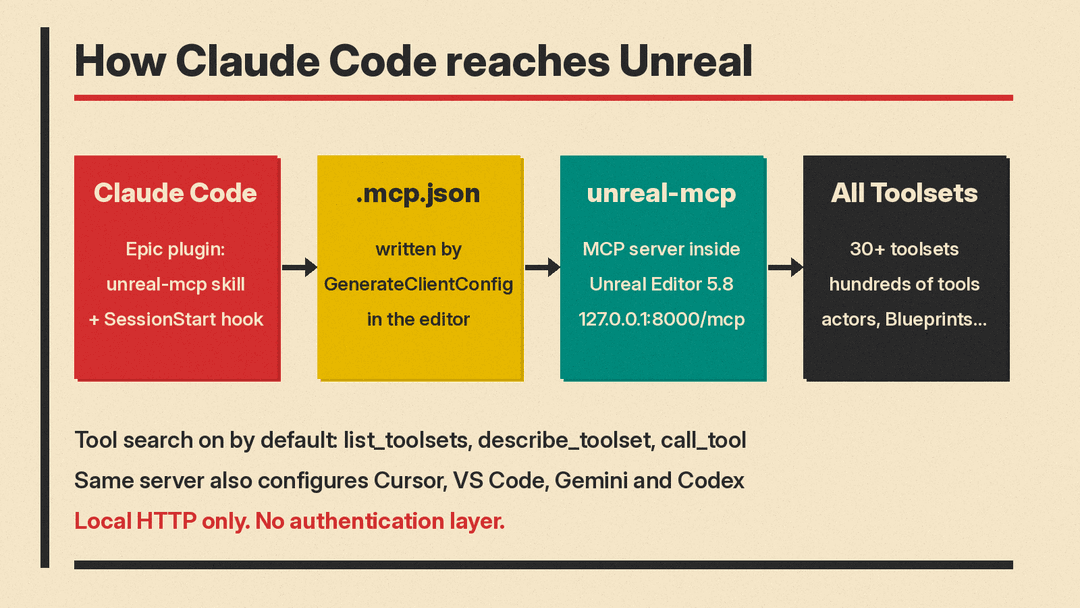
How the pieces fit together
There are three layers, and it helps to keep them apart.
1. Unreal MCP (the server). It runs inside the Unreal Editor process and serves MCP over local HTTP. Epic's docs list the default endpoint as http://127.0.0.1:8000/mcp, and the server always names itself unreal-mcp. It runs tool calls on the engine's game thread.
2. All Toolsets (the tools). Unreal MCP ships no tools of its own. Epic's docs say the All Toolsets plugin "must be used to enable them." Toolsets come from a registry inside the engine, and you can write your own in Python or C++.
3. Epic's Claude Code plugin (the instructions). This is what went viral. It gives Claude a skill that explains how to drive the editor safely, plus a SessionStart hook that tells Claude it is in an Unreal project so it defaults to Unreal conventions such as UObject, Slate and UHT. The plugin does not ship a static .mcp.json file. The editor writes that file for you.
One design detail keeps this usable. By default the server uses "tool search": instead of listing every tool, it exposes three meta-tools, list_toolsets, describe_toolset and call_tool. The agent looks up a toolset when it needs one. Epic says this keeps the tool list small even when hundreds of tools exist, and the skill says it keeps "your context window small and the prompt cache warm."
How to set it up
These steps come from Epic's Unreal MCP docs and the plugin README.
- Use Unreal Engine 5.8. The MCP server is a 5.8 feature.
- Enable two plugins. In Edit > Plugins, enable Unreal MCP and All Toolsets, then restart the editor. The Toolset Registry dependency turns on by itself.
- Start the server. Type
ModelContextProtocol.StartServerin the editor console, or turn on Auto Start Server under Editor Preferences > General > Model Context Protocol. - Write the client config. Run
ModelContextProtocol.GenerateClientConfig ClaudeCodein the console. It writes.mcp.jsonto the project root. UseAllto write configs for every supported client at once. - Install the Claude Code plugin. In Claude Code, run
/plugin install unreal-engine-skills-for-claude-code@claude-plugins-official. If the marketplace is missing, add it first with/plugin marketplace add anthropics/claude-plugins-official. - Start Claude Code from the project root and check
/mcpforunreal-mcp. Epic suggests a first test prompt: "List all actors in the current level."
For a team, commit the enabledPlugins entry from the README to .claude/settings.json. Anyone who trusts the project folder is then prompted to install it.
Two platform notes from the README. The session hook is a bash script, so Windows users need Git Bash or WSL. Without one, the MCP tools still work but the project-context note does not load. And if port 8000 is taken, pass a different port to StartServer and regenerate the config.
It is not Claude-only
The plugin is Claude Code packaging. The server is not. Epic's docs say any MCP client, "such as Claude Code, Cursor, or the MCP Inspector," can drive the editor, and GenerateClientConfig accepts ClaudeCode, Cursor, VSCode, Gemini, Codex and All. One quirk: the JSON configs merge safely on repeat runs, but the Codex CLI's TOML config is write-once, so you must delete a stale one by hand.
What you lose outside Claude Code is Epic's skill: the written rules for discovery, saving and serial calls. Other agents get the raw tools. The Hermes Agent docs already include their own Unreal MCP skill built on the same server.
What Epic tells you to be careful about
The README's security section is blunt. Installing the plugin "gives Claude broad, live access to the running Unreal Editor," and Epic says to treat that "the same way you would treat running arbitrary code from an assistant, because in practice it is." The main points:
- "Localhost is not a trust boundary." The server checks origins to stop browser tabs, but any process running as the same user on the same machine can connect. Epic's docs add that the server has no authentication layer.
- One tool runs arbitrary Python.
ProgrammaticToolset.execute_tool_scriptruns Python inside the editor with access to every toolset, the project on disk and the asset database. - Skip-permissions mode removes the safety net. Epic recommends not running Claude Code with
--dangerously-skip-permissionswhile the plugin is loaded. If you do, use narrow prompts, read-heavy tasks or a throwaway project. - Commit first. MCP tools can "mutate, move, or delete VCS-tracked assets in a single call." Save and commit before a long session and review the diff after.
The skill adds rules for the agent itself: save before and after bulk changes, wait for compiles to finish, serialize dependent calls, check every result, and watch for Play-in-Editor, since editor-only tools behave differently while it runs.
Known limits
Epic labels Unreal MCP Experimental and warns that "many features are incomplete or missing" and that APIs and data formats can change. Its docs also list these limits:
- Only HTTP and Server-Sent Events transports work.
stdioand WebSocket do not. - No shipping toolset offers MCP Resources or Prompts, so it is tools only.
- Adding a new C++ tool function needs an editor restart. Live Coding only picks up changes to existing function bodies.
- Projects on older engines are out. "It won't run in your Otherside project yet. It needs UE 5.8's MCP server, and ODK ships 5.5.4," wrote @JayBClassics.
Why it matters
Coding agents have mostly lived in text: source files, terminals and pull requests. A game engine editor holds much of a project's work in assets, graphs and scenes that an agent could not easily reach. Epic putting an MCP server inside the editor, and choosing an open protocol instead of a single AI vendor, makes the editor itself an agent surface. That is the real story, and it dates to June.
The Claude Code plugin is the friendliest way in for now, because it adds Epic's own operating rules on top of the raw tools. For studios, the practical questions are less about prompts and more about guardrails: which machines run the server, whether skip-permissions is allowed, and how asset changes get reviewed before they land. For a wider list of AI tools for game work, see our guide to the best AI tools for game developers.
Sources
- EpicGames/unreal-engine-skills-for-claude-code-plugin (GitHub README)
- unreal-mcp skill file (GitHub)
- Unreal MCP in Unreal Editor (Unreal Engine 5.8 docs)
- Unreal Engine 5.8 is now available (Epic Games)
- Unreal Engine 5.8 Released (Epic Developer Community forums)
- Unreal Engine MCP listing (Claude plugin marketplace)
- Unreal MCP skill (Hermes Agent docs)
- @RoundtableSpace on X
- @webtkdev on X
- @JayBClassics on X
