
"Vibe coding" is a label for building software with an AI coding agent doing most of the file edits, tests, and shell work while you steer architecture, prompts, and review. DeepLearning.AI's Vibe Coding 101 with Replit page describes it as leaning into an agent for heavy lifting while you focus on architecture and features, and notes that effective practice is not one-shot prompting. Vibe Code School defines it as building at the level of intent: you describe outcomes; an agent such as Claude Code, Codex, or Google Antigravity handles edits and runs; you specify, review, and correct.
Beginners searching for courses want a clear answer to three questions: what is free to take today, what still needs a paid plan or certificate fee, and which path matches the tool they will actually use (browser Replit, Cursor, Claude Code in a terminal, or a multi-tool survey). We opened every course page linked below in October 2026 and recorded what each page says about cost, length, and prerequisites. Prices and policies change, so confirm on the live page before you enroll.
For broader free AI foundations that are not vibe-coding specific, see our list of free AI courses checked in 2026. For a Claude-focused workflow walkthrough rather than a course catalog, see vibe coding with Claude prompts and a step-by-step workflow. To compare the tools themselves on price and limits, see our guide to the best vibe coding tools in 2026.
Quick pick by goal
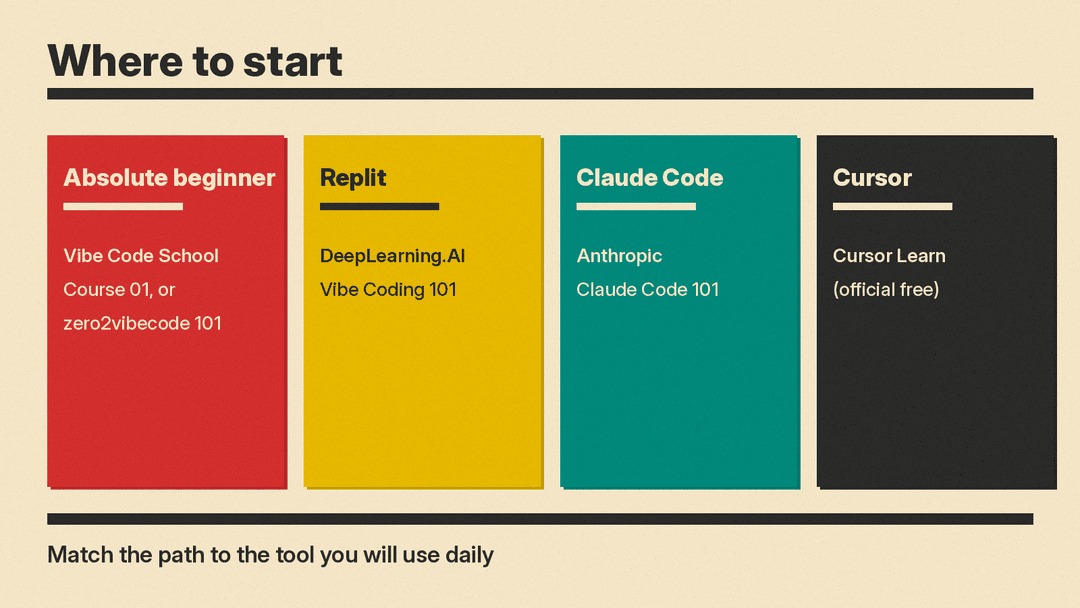
- Absolute beginner, no coding background: Vibe Code School Course 01 (Claude Code track) or zero2vibecode Vibe Coding 101
- Build and deploy in a cloud IDE: DeepLearning.AI Vibe Coding 101 with Replit (free Replit account required)
- Daily driver is Claude Code in the terminal: Anthropic Claude Code 101 (course hosting free; Claude Pro, Max, Enterprise, or an API key required to use the tool)
- Daily driver is Cursor: Cursor Learn (official free course) or Codecademy Intro to Vibe Coding (certificate gated to Plus or Pro)
- Structured paid path with certificate and several tools: Coursera Vibe Coding Essentials with Scrimba
- Short free content, paid certificate: Great Learning Academy Learn Vibe Coding with AI Tools
- Agent systems with Google: the June 2026 Google/Kaggle vibe-coding intensive was a time-boxed free event (live window past as of October 2026); see notes below
Free and freemium courses
DeepLearning.AI: Vibe Coding 101 with Replit
Vibe Coding 101 with Replit is a short course from DeepLearning.AI built with Replit. Instructors listed on the page are Michele Catasta and Matt Palmer. The page shows Updated Jul 17, 2026 and "Earn an accomplishment with PRO."
The outline lists 7 video lessons with times that sum to about 1.5 hours: Introduction (3m), Principles of Agentic Code Development (18m), Planning and Building an SEO Analyzer (23m), Implementing SEO Analysis Features (12m), Planning and Building a Voting App (26m), Enhancing the National Parks Voting App (7m), and Next steps and Best Practices (4m). Learners build a website performance (SEO) analyzer and a national parks voting app with persistent storage, then deploy so others can access the app.
Who should join: the page says anyone can join, and that it is helpful to have some coding experience and some background in prompting LLMs. Completing the course requires a free Replit account. Best for beginners who want cloud build-and-deploy practice with an agent, not a local terminal install.
Vibe Code School
Vibe Code School states that all 170 lessons across seven courses are free, with no signup, no paywall, and no email capture. Progress, XP, streaks, and badges live in browser local storage. The curriculum is open source on GitHub. Finishing a course lets you generate a free completion certificate.
The FAQ says Course 01 (Vibe Coding using Claude Code) assumes zero coding background. The site also mentions Codex and Google Antigravity tracks, plus prompt engineering and agentic engineering courses. Lessons are walkthroughs on your machine, sandbox replays, or concept lessons, each gated by a quiz. Best for absolute beginners who want a long free path without creating an account.
zero2vibecode
zero2vibecode markets free courses for people who have never opened a terminal. Lessons run in a browser terminal simulator with nothing to install. The catalog lists 5 courses and 88 lessons. Flagship Vibe Coding 101 is 15 lessons and about 2 hours. Other listed courses include Terminal Basics, Claude Code from Zero, Claude Code: Pro Level, and tool comparison material. The page states "100% free FOREVER," with no card and signing in optional. Best for absolute beginners who want a simulator before installing anything.
Cursor Learn
Cursor Learn is Cursor's official free course on using AI to be more effective as a programmer. The page says it is not a machine learning or model-training course. It covers how models work, their limits, and practical patterns for building software with AI tools. Examples use Cursor, but the page says the patterns apply to any AI model or product. Best for people who already write some code and want the vendor's own mental model for Cursor.
Anthropic: Claude Code 101
Claude Code 101 on Anthropic's Skilljar academy walks from installation to advanced customization. Learning objectives on the page include the agentic loop, Explore → Plan → Code → Commit, context management, CLAUDE.md, subagents, MCP servers, and hooks.
Prerequisites stated on the page: basic familiarity with a code editor and the command line, and a Claude account (Pro, Max, or Enterprise) or an API key. Course hosting is free to access on Skilljar; using Claude Code itself needs a paid Claude plan or API key. State that clearly when you budget time: the lessons are free, the agent runtime is not. Best for beginners and experienced engineers who will use Claude Code daily. Pair with our Claude vibe-coding workflow post for prompt patterns after the course.
Great Learning Academy: Learn Vibe Coding with AI Tools
Learn Vibe Coding with AI Tools is listed as Beginner, 1.5 learning hours. The FAQ says you may enroll and access course content for free, and that a certificate requires a non-refundable fee. Modules cover fundamentals, IDE setup, AI tools demos, hands-on demos, and best practices. The page says no prior coding knowledge is required. Best for a short free survey of the idea; treat the certificate as optional paid add-on.
Google and Kaggle agent materials (dated carefully)
Google's blog post of April 27, 2026 announced a free five-day AI Agents Intensive with Kaggle for June 15-19, 2026, framed around vibe coding and building agents with natural language workflows. That live window is past as of October 19, 2026. Kaggle still hosts the June intensive's overview page, which recommends prior Python experience, and the earlier November 2025 intensive is now a self-paced Kaggle Learn guide. See the Google blog announcement for the original dates. Do not enroll expecting an open live cohort in October 2026.
Optional: Prompter vibe coding lessons
Prompter's vibe coding course lists 12 free lessons in English on Cursor AI and GitHub Copilot, with modules on basics, Cursor modes, practical projects, and Git/deployment. The FAQ says all Prompter Academy courses including this one are completely free and open. Include it as a thin free supplement if you want extra Cursor practice; it is not a substitute for Cursor Learn or a longer curriculum.
Paid and subscription courses
Coursera: Vibe Coding Essentials - Build Apps with AI (Scrimba)
The Vibe Coding Essentials specialization on Coursera is a 5-course series from Scrimba. The page lists beginner level, no prior experience required, about 4 weeks at 10 hours a week, and a shareable certificate from Scrimba. Instructors include Per Harald Borgen and others. Course titles on the page include Vibe Coding with Cursor AI, Vibe Coding with GitHub Copilot, Vibe Coding with Claude Code, Intro to Model Context Protocol (MCP), and Learn to code with AI.
The FAQ answers "Can I take the course for free?" with "No." Financial aid is available in select programs. One learner review dated March 23, 2026 on the Cursor AI course said the material was based on Cursor 1.x and that, with Cursor 2.x out since October 2025, several of its features are outdated; that is a reviewer claim, not a statement from Coursera or from this post that the whole specialization is obsolete. Best for beginners who want a paid certificate and a multi-tool survey (Cursor, Copilot, Claude Code, MCP).
Codecademy: Intro to Vibe Coding
Intro to Vibe Coding is listed as beginner, about 1 hour, no prerequisites, with 2 lessons, 1 project, and 2 quizzes. The syllabus covers what vibe coding is and vibe coding basics using the Cursor IDE. The page states that a certificate of completion is available with Plus or Pro. The course landing page does not say the lessons themselves are free, so treat it as a Codecademy course and confirm access under your account tier; only the certificate gating to Plus or Pro is stated explicitly. Best for a short Cursor-oriented intro if you already use Codecademy.
Suggested path
An ordered path that matches the free and paid options above:
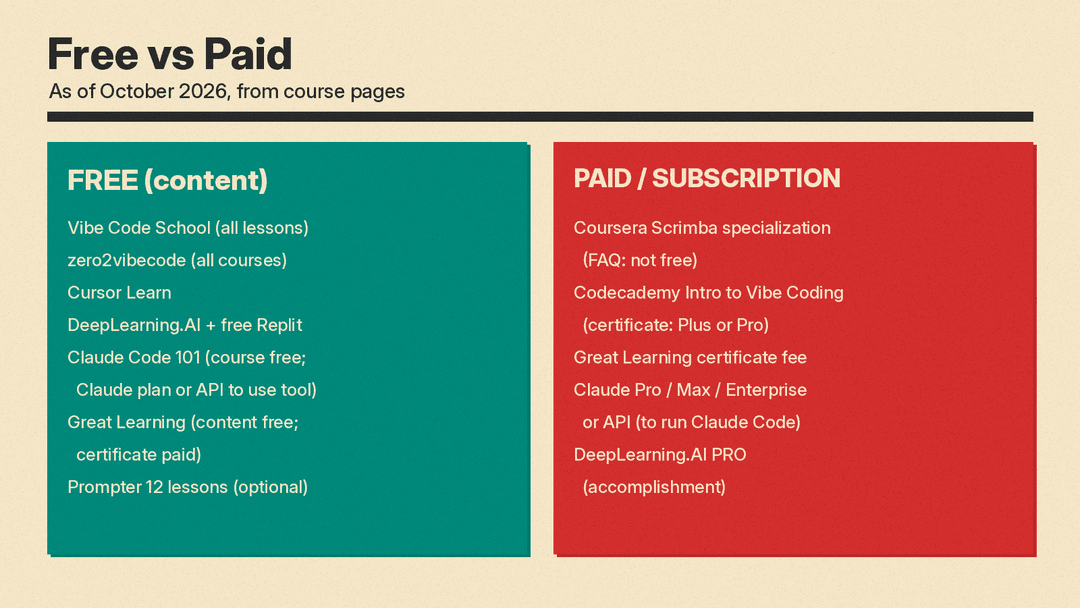
- Absolute beginner: start with Vibe Code School Course 01 or zero2vibecode Vibe Coding 101 so you see agent behavior before you buy tools.
- Deploy practice: take DeepLearning.AI Vibe Coding 101 with Replit and ship the SEO analyzer and voting app on a free Replit account.
- Daily tool: pick Cursor Learn if your editor is Cursor, or Anthropic Claude Code 101 if your daily agent is Claude Code (budget for Pro, Max, Enterprise, or API usage).
- Paid survey and certificate: add the Coursera Scrimba specialization if you want Cursor, Copilot, Claude Code, and MCP in one structured track with a shareable certificate.
You do not need every course. One free starter plus one tool-specific course is enough for most beginners.
What these courses do not replace
Vibe coding courses teach prompting, review, and tool workflows. They do not replace fundamentals in programming, systems, or ML when a role requires them. For free courses on generative AI, ML, and agents outside the vibe-coding niche, use the verified free AI courses list. For how junior hiring pressure shows up in the industry, see how Anthropic's junior share of tech hires fell and what it means for entry-level AI jobs. Build a small shipped project from one of the free courses above before you treat a certificate as proof of skill.
Sources
- DeepLearning.AI: Vibe Coding 101 with Replit
- Vibe Code School
- zero2vibecode
- Cursor Learn
- Anthropic Academy: Claude Code 101
- Great Learning Academy: Learn Vibe Coding with AI Tools
- Google blog: AI Agents Vibe Coding Course with Kaggle, June 2026
- Kaggle: 5-Day AI Agents: Intensive Vibe Coding Course With Google (June 15 to 19, 2026)
- Kaggle Learn: 5-Day AI Agents Intensive Course with Google (self-paced)
- Coursera: Vibe Coding Essentials - Build Apps with AI
- Codecademy: Intro to Vibe Coding
- Prompter: Programming with AI (vibe coding)
