
OpenAI now sells four GPT-6 models through its API, and the names do not make the choice obvious. GPT-6 Astra is the top model. GPT-6 Sol and GPT-6 Luna arrived as cheaper tiers. Then, one week later, GPT-6.1 Sol replaced Sol as the middle option at the same list price. This guide sets out what each model costs, where you can use it, how OpenAI says to pick one, and when the older GPT-6 Sol still makes sense.
The short answer, based on OpenAI's own documents: use GPT-6.1 Sol for most complex work, GPT-6 Luna for high-volume tasks with a clear goal, and GPT-6 Astra when quality matters more than cost. Keep GPT-6 Sol only if your code depends on the none reasoning setting.
The four models at a glance
- GPT-6 Astra (
gpt-6-astra): OpenAI calls it "our most capable model for the most demanding work." It launched on September 3, 2026. We covered it in our GPT-6 Astra explainer. - GPT-6 Sol (
gpt-6-sol): introduced with Luna on September 22, 2026 and "built for complex coding and agentic workflows." Its model page now points readers to GPT-6.1 Sol as "the newer Sol model." - GPT-6.1 Sol (
gpt-6.1-sol): introduced September 29, 2026 as "an upgrade to GPT-6 Sol." OpenAI's tagline is "Near-Astra intelligence for a fifth of the price." - GPT-6 Luna (
gpt-6-luna): "Our most efficient model for focused, high-volume tasks."
OpenAI's Using GPT-6 guide now lists only three models as the current family: Astra for "Highest intelligence," GPT-6.1 Sol for "Balanced speed, cost, and intelligence," and Luna for "Fastest and most cost-effective."
What they cost in the API
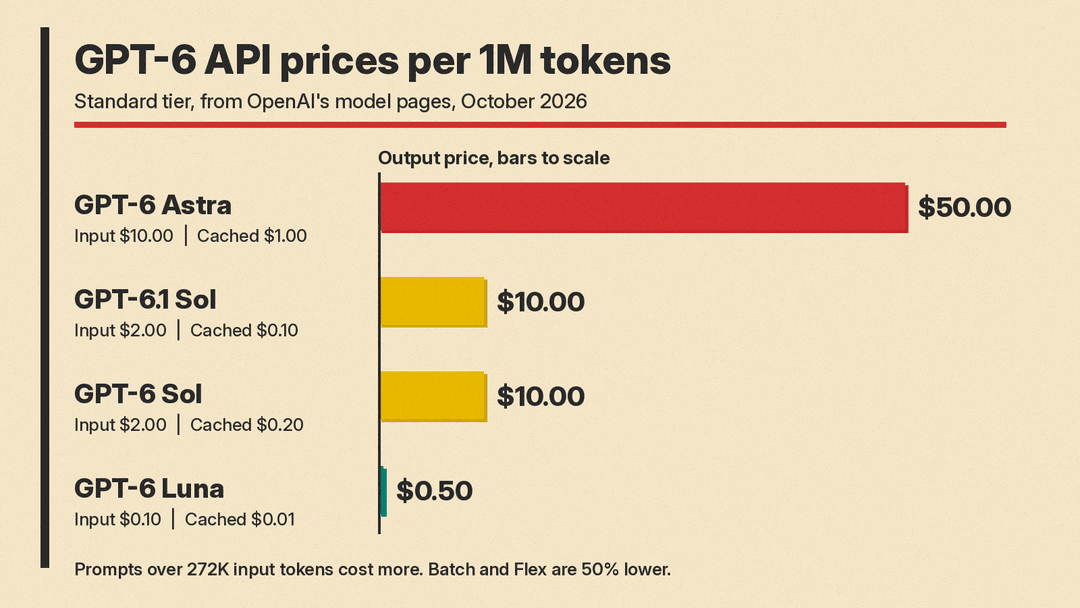
Standard prices per million tokens, from each model's page in OpenAI's API docs, as of October 2026:
- GPT-6 Astra: $10 input, $1 cached input, $50 output. Cache writes cost $12.50.
- GPT-6.1 Sol: $2 input, $0.10 cached input, $10 output. Cache writes cost $2.50.
- GPT-6 Sol: $2 input, $0.20 cached input, $10 output. Cache writes cost $2.50.
- GPT-6 Luna: $0.10 input, $0.01 cached input, $0.50 output. Cache writes cost $0.125.
The one price difference between the two Sol models is caching. On the GPT-6.1 Sol page, cached input is 5% of the uncached input rate. On the GPT-6 Sol page and the GPT-6 Luna page, it is 10%. OpenAI's launch post says GPT-6.1 Sol's cached input is "50% less than GPT-6 Sol's cached input pricing." For agents that resend the same long context on every turn, that is the main cost gap between the two.
Rules that apply to all four models:
- Prompts with more than 272K input tokens are billed at 2x the input and cache rates and 1.5x the output rate for the full request.
- Cache writes are billed at 1.25x the uncached input rate.
- Batch and Flex processing cost 50% less than Standard.
- Fast mode costs 2x Standard.
Two more rules on some pages: GPT-6.1 Sol's page says Ultrafast mode is priced at 6x Standard, and the Sol, 6.1 Sol and Luna pages say regional processing adds a 10% premium where available.
For how these rates compare with Claude, Gemini and DeepSeek, see our LLM API pricing comparison.
What the four models share
The model pages list the same core specs for all four:
- 1,050,000-token context window.
- 128,000 maximum output tokens.
- Text and image input, text output.
- Reasoning token support.
Knowledge cutoffs differ slightly: April 30, 2026 for Astra and GPT-6.1 Sol, April 20, 2026 for GPT-6 Sol, and May 18, 2026 for Luna.
The technical differences that matter
The differences are in settings and API support, not in context size.
Reasoning effort. GPT-6 Sol and GPT-6 Luna accept none, low, medium, high, xhigh and max. GPT-6 Astra and GPT-6.1 Sol do not support none. The GPT-6 guide tells developers moving to those two models to use low instead. GPT-6.1 Sol also does not support minimal.
Tool calling. For Astra and GPT-6.1 Sol, tool calling needs the Responses API. Chat Completions works for requests without tools. GPT-6 Sol and Luna support function calling in Chat Completions only with reasoning effort set to none. OpenAI's guide says to use Responses for reasoning with tools.
Speed modes. The GPT-6 guide says all Astra users can use Fast mode and Ultrafast mode. The GPT-6.1 Sol page also lists Ultrafast, used with service_tier: "ultrafast" in the Responses API. OpenAI's launch post says GPT-6.1 Sol Ultrafast offers "up to 8x faster token generation compared to its standard speed in Codex."
EU data residency. Fast mode supports EU data residency for GPT-6.1 Sol, GPT-6 Sol and Luna, but not for Astra, according to the GPT-6 guide. Ultrafast for GPT-6.1 Sol supports US and EU data residency. Astra Ultrafast supports US data residency and global processing only. For a European team that needs fast responses with data kept in the EU, this rules Astra out of Fast mode.
Where you can use them in ChatGPT
The answer is narrower than many users expect. OpenAI's Codex models page says: "In ChatGPT, GPT-6.1 Sol, GPT-6 Sol, and GPT-6 Luna are available in Work and Codex. They aren't available in Chat."
- GPT-6.1 Sol: Plus, Pro, Business, Enterprise and Edu, in Codex (desktop app and CLI) and in ChatGPT Work on web and mobile. On Enterprise and Edu plans, it stays off until an administrator turns it on. Free and Go were not included at launch.
- GPT-6 Sol and GPT-6 Luna: OpenAI's launch post says both reached ChatGPT Work and Codex for Plus, Pro, Business, Enterprise and Edu users. Free and Go users can use GPT-6 Luna in the desktop app.
- Ultrafast for GPT-6.1 Sol in ChatGPT: available on Pro $500 and eligible Enterprise and Edu plans.
The Codex page also says older GPT-5.6 Sol, Terra and Luna models "remain available during the rollout," and that choosing a new model "doesn't change workspace permissions or grant access to it." If you are also comparing coding tools, our Cursor vs Claude Code vs Codex guide covers plan prices.
How OpenAI says to choose
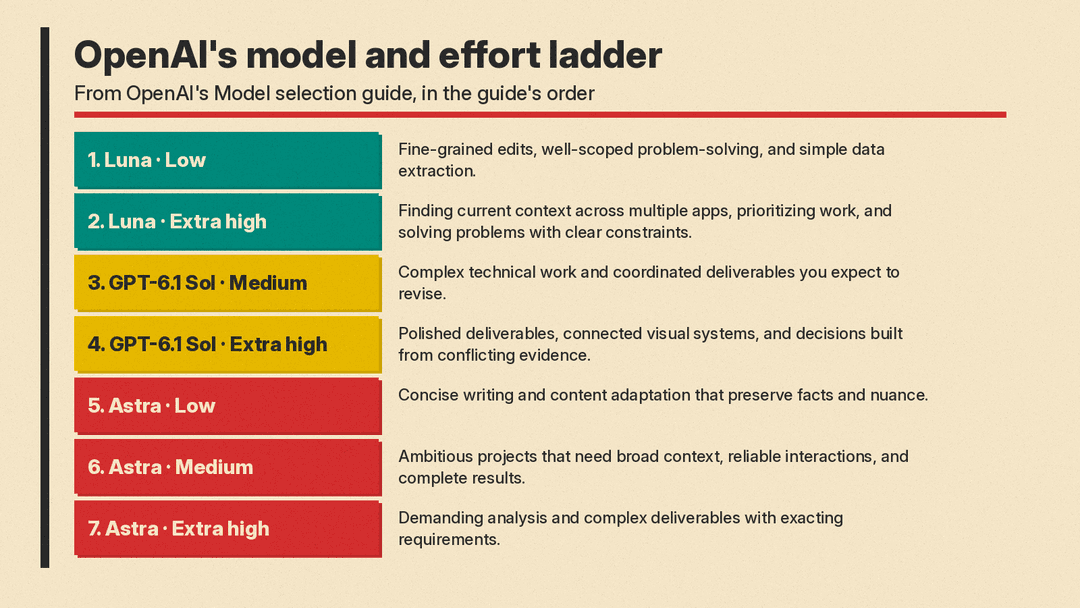
OpenAI's Model selection guide treats the model and the reasoning level as one choice. It says: "If cost and latency aren't a concern, you can default to Astra." For everyone else, it gives a seven-step ladder that pairs a model with an effort level. Some examples from that list:
- Luna, Low: "Fine-grained edits, well-scoped problem-solving, and simple data extraction."
- GPT-6.1 Sol, Medium: "Complex technical work and coordinated deliverables you expect to revise."
- GPT-6.1 Sol, Extra high: "Polished deliverables, connected visual systems, and decisions built from conflicting evidence."
- Astra, Extra high: "Demanding analysis and complex deliverables with exacting requirements."
Note that Astra at low effort is on the ladder for "Concise writing and content adaptation that preserve facts and nuance." So OpenAI does not treat Astra only as a model for the hardest problems.
OpenAI's model guide for the GPT-6 family, published October 2, gives similar advice in plainer terms:
- GPT-6 Astra "for the hardest reasoning work where maximum intelligence is needed."
- GPT-6.1 Sol "for complex coding, research, and computer use."
- GPT-6 Luna "for focused tasks at scale and everyday, repeated work with a clear goal, such as extracting invoice fields, classifying requests, or producing structured summaries."
It also gives a rule for effort levels: low for routine tasks, medium for work that needs judgment, high for difficult debugging or careful review, and extra high or max only "when High falls short," kept "only if the improvement justifies the added time and cost."
What OpenAI's benchmarks show
All the numbers below come from OpenAI's own launch posts. OpenAI says competitor scores were "taken from publicly available reports" and that results in ChatGPT can differ from its research setup. Treat them as the vendor's claims.
GPT-6.1 Sol against Astra and GPT-6 Sol, from the GPT-6.1 Sol post:
- DeepSWE v1.1 (software engineering in real codebases): matches GPT-6 Astra "at roughly one-fifth of the cost," and beats GPT-6 Sol's best score by 6.4 percentage points.
- OSWorld 2.0 offline (computer use): 7 percentage points above GPT-6 Sol at maximum effort, and within 2.1 points of Astra at "roughly one-seventh the cost per task."
- Terminal-Bench Science 0.1: $5.47 per task at maximum effort, against $23.80 for Astra. Astra still has the top score among the models tested, 68.1%, and OpenAI says it "should be used for the most difficult scientific research tasks."
- Factuality at low effort: the share of answers with a factual error fell from 11.4% for GPT-6 Sol to 7.7%.
GPT-6 Sol and Luna, from the Sol and Luna post:
- DeepSWE v1.1: GPT-6 Sol at max effort scored 68.8%. GPT-6 Luna at max effort scored 66.6%.
- AutomationBench: GPT-6 Sol at xhigh effort scored 33.2% at $0.27 per task, above GPT-6 Astra at low effort (30.3%).
- OSWorld 2.0 offline: GPT-6 Sol at xhigh scored 60.5%.
In OpenAI's numbers, a cheaper model at high effort can beat Astra at low effort. GPT-6 Sol at xhigh did that on AutomationBench, where OpenAI puts Astra's cost per task at 3.9x Sol's. That is why OpenAI's guidance tells you to test effort levels as well as models.
Is GPT-6 Sol still worth using?
For new projects, the documents give little reason to choose it. GPT-6.1 Sol has the same $2 input and $10 output list prices, half the cached input price, and higher scores in every comparison with GPT-6 Sol in OpenAI's launch post. The GPT-6 guide already lists GPT-6.1 Sol, not GPT-6 Sol, as the middle model. For how GPT-6.1 Sol compares with Claude Sonnet 5.5 and Gemini 3.8 Flash, see our mid-tier model comparison.
The exception is the none reasoning setting. If your app runs GPT-6 Sol with reasoning off, or uses function calling through Chat Completions, which needs none on Sol and Luna, GPT-6.1 Sol will not accept the same request. You will need to switch to low effort, move tool calls to the Responses API, or use Luna. OpenAI's guide asks developers already on gpt-6-sol to "review the migration guidance" before they switch.
OpenAI has not published a retirement date for GPT-6 Sol on the pages cited here. Its recent GPT-4o and GPT-4.1 shutdown notice gave three months' warning.
A simple way to decide
- High volume, clear task (classifying tickets, pulling fields from invoices, short summaries): start with GPT-6 Luna at low effort.
- Coding agents, computer use, multi-step business work: start with GPT-6.1 Sol at medium effort, then try extra high on the hard cases.
- Work where an error costs more than the tokens: test GPT-6 Astra, and try low effort before you assume you need more.
- Existing GPT-6 Sol apps: plan a move to GPT-6.1 Sol, unless you depend on
nonereasoning.
OpenAI's own last word on this is to test: "experiment using the same inputs to compare results and keep the lightest setting that meets your quality bar."
Sources
- OpenAI: Introducing GPT-6.1 Sol
- OpenAI: Introducing GPT-6 Sol and Luna
- OpenAI: A model guide for the GPT-6 family
- OpenAI: GPT-6 Astra
- OpenAI API docs: Using GPT-6
- OpenAI API docs: Model selection
- OpenAI API docs: GPT-6.1 Sol model page
- OpenAI API docs: GPT-6 Sol model page
- OpenAI API docs: GPT-6 Luna model page
- OpenAI API docs: GPT-6 Astra model page
- OpenAI Developers: Codex models
