
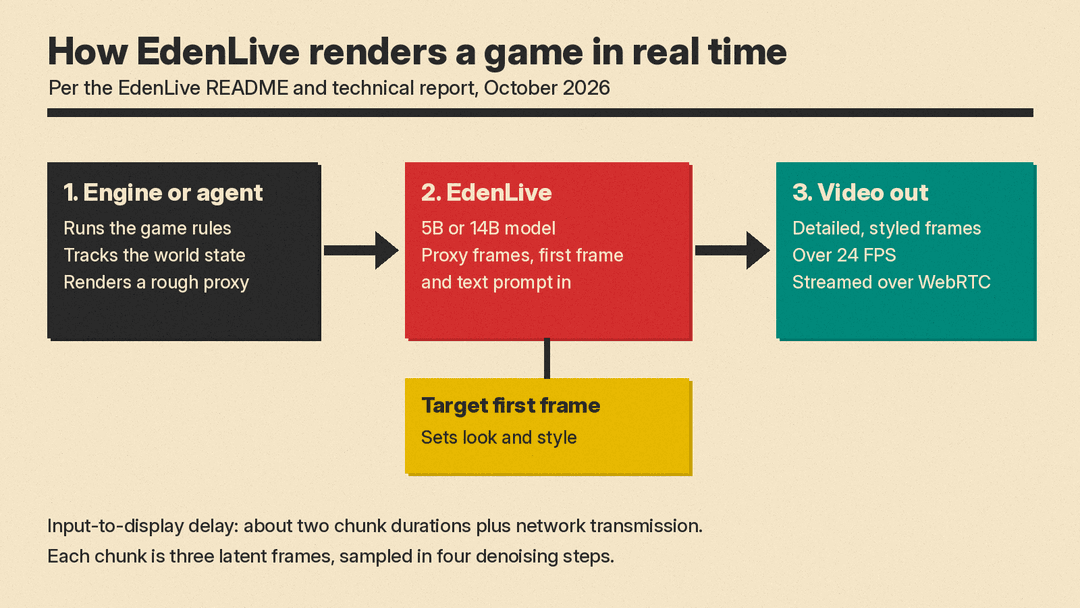
Most AI video models that try to act like a game do two jobs at once. They guess what happens next in the world, and they paint every pixel of it. VAST's new open model, EdenLive, does only the second job. A game engine or a coding agent runs the rules and tracks the world, renders a rough "proxy" video of it, and EdenLive repaints that proxy into detailed, styled video in real time.
VAST, a 3D generative AI company whose Project Eden research sits on the Tripo3D site, has released the code on GitHub, 5B and 14B weights on Hugging Face, and a technical report. The repository went up on October 12 (UTC), and the launch drew coverage on October 19. Here is what it does, what it needs to run, and what the license allows.
What EdenLive takes in and puts out
Each request has three inputs, per the model card:
- A reference video stream. This can be a greybox game render, a normal map, a scene preview, or a real recording. It carries the scene layout, camera motion and coarse movement.
- A target first frame. This sets how things should look: the subjects, materials and visual style.
- A text prompt. In the real-time setup the engine can also append short captions for events inside each chunk, such as a landed hit, according to the report.
The output is a new video that follows the reference's layout and motion but takes its look from the first frame and prompt. The README says the project page demonstrates over 24 FPS, minute-scale generation, and 480p or 720p output.
Why split the world from the pixels
The report's argument is about control. In a video world model that learns everything in pixels, the state of the world lives inside the model's context and generated frames, "so it cannot be directly inspected, edited, or verified," the authors write. With EdenLive, the engine keeps the game logic and world state explicit, so developers can inspect, change and test them directly. The model only has to learn appearance, which the authors say lets the limited capacity of a real-time model go to visual quality.
That is a different bet from Runway's GWM Worlds 2, a research preview from September that generates interactive worlds with audio at 720p and 24 fps and is steered by text actions and camera input. Runway's own limitations section notes that its long-term memory is imperfect and that getting the most from free-form text control "can require an external real-time harness that tracks the state of the world." EdenLive makes that outside program the core of the design. Viggle's JST-2 takes another route: it models scenes as persistent atoms in 3D space and decodes them into images or 3D Gaussian splats, as our JST-2 explainer describes.
How it runs in real time
EdenLive starts from the open Wan video models: the 14B version from Wan2.1-I2V-14B at 480p, and the 5B version from Wan2.2-TI2V-5B at 720p, per the README. Three pieces make it fast enough to play:
- A fine-tuned vision encoder. A post-trained DINOv3 encoder turns each proxy frame into features, so a crude greybox and a real recording land in the same feature space. The report says this reduces leakage of the reference's own look into the output.
- Few-step, chunk-by-chunk generation. The model is distilled to generate video in chunks of three latent frames with four denoising steps each, while attending to a bounded cache of recent history.
- A pipelined server. While chunk k-1 is being generated, the engine is already simulating and rendering chunk k. The report puts the input-to-display delay at about two chunk durations plus network transmission. Frames stream to the browser over WebRTC.
Speed, latency and memory
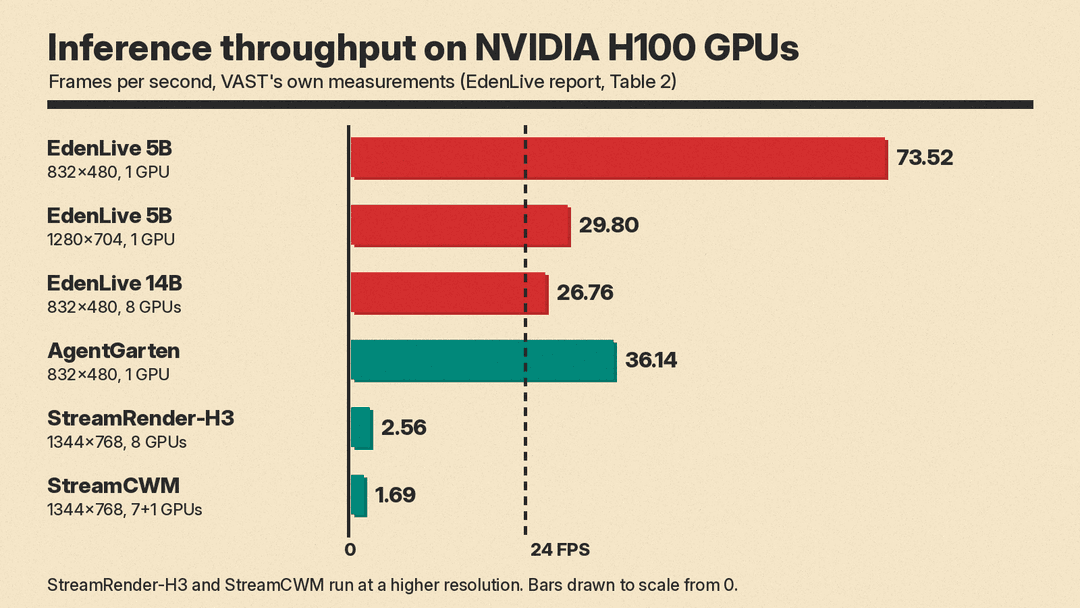
VAST measured throughput on NVIDIA H100 GPUs on roughly 30-second inputs, timing from condition processing until frames are in CPU memory. These are the company's own numbers:
- EdenLive 5B at 832 x 480, one H100: 73.52 FPS, with 826 ms to the first frame.
- EdenLive 5B at 1280 x 704, one H100: 29.80 FPS, with 1,162 ms to the first frame and 38.94 GiB peak reserved memory.
- EdenLive 14B at 832 x 480, eight H100s: 26.76 FPS, with 1,714 ms to the first frame.
In the same table, AgentGarten reached 36.14 FPS at 832 x 480 on one H100, while StreamRender-H3 and StreamCWM, at 1344 x 768 on eight GPUs, reached 2.56 and 1.69 FPS. Those two run at a higher resolution, so the gap is not like for like.
On consumer hardware, the README says that with LightX2V acceleration, EdenLive 5B reaches about 24.7 FPS at 1280 x 704 on a single RTX 5090, enough for 24 FPS playback.
How good is the output
The report compares 30-second, long-horizon runs against two other autoregressive methods, AgentGarten and StreamCWM. EdenLive 14B posted the lowest camera rotation error and the best scores for first-frame consistency, text alignment and subject consistency, plus the lowest aesthetic drift. In a pairwise test judged by a vision language model, the 14B and 5B models took the top two Elo ratings in all five judged dimensions. For short five-second clips, the report shows side-by-side frames against models including Seedance 2.0, MiniMax H3 and LTX 2.5, and claims "competitive reference adherence and appearance preservation."
All of these evaluations were run by VAST on its own test set. No independent benchmark has been published yet.
What you need to run it
This is not a phone app. The README lists:
- Linux on x86-64 with NVIDIA GPUs with 80 GB of memory as the verified setup.
- About 210 GB of weights for the full download.
- Python 3.10, a PyTorch nightly for CUDA 13, and a pinned set of libraries.
- One GPU for the default 5B real-time service; the 14B model can be sharded across several.
The repo also ships a workbench: a game library, a chat that builds new games from a text description, and a play window. Its game-prototype-turbo skill turns a text prompt into a coarse playable game, and the bridge host requires the claude CLI. Two sample greybox recordings come with the repo for a quick test. For other AI tools across a game pipeline, see our guide to the best AI tools for game developers.
What the license allows
The code is Apache 2.0, but the weights are mixed, per the model card:
- The diffusion transformer, VAE, text encoder, schedulers and decoders are Apache 2.0.
- The CLIP image encoder is MIT, and the vision encoder falls under Meta's DINOv3 License.
- The
flux-c2fcomponent, FLUX.2 [klein] 9B plus a VAST LoRA, is under the FLUX Non-Commercial License. It only renders the workbench's photoreal first frame, so the workbench is non-commercial only. The offline and real-time video pipelines do not load it.
So a studio can build on the core renderer under permissive terms, as long as it checks the DINOv3 terms and skips or replaces the FLUX first-frame step for commercial use.
Who it is for
The report lists four uses: previews of agent-built games, appearance exploration, re-rendering and stylizing recorded video, and augmenting data for embodied AI. For video creators without a game engine, restyling is the easiest to try: record or block out a scene, then let EdenLive repaint it from one styled first frame.
The authors also list what it does not do yet. It has no explicit link between proxy objects and their intended identities, no dedicated memory for fine details after an object is hidden and comes back, and no setting for how strictly to follow the reference.
For hosted tools that turn a prompt into a finished clip, see our guide to the best AI video generators.
For a head-to-head on two leading 30-second models, see Kling 4.0 vs Seedance 2.5.
