
OpenBMB's MiniCPM-V 4.7 is a vision language model built for phones, and the big claim is about memory, not scores. The larger version is a 35B-A3B mixture-of-experts model, which in the usual naming means 35 billion total parameters and about 3 billion active per token. OpenBMB says it runs on an iPhone at a usable speed without cutting what the model can do. Both sizes are open weights under Apache 2.0.
The team released MiniCPM-V 4.7 on October 12 and added speculative decoding heads on October 15. It comes in two sizes: 35B-A3B, the first mixture-of-experts (MoE) model in the MiniCPM-V series, and 1B. As of October 19, Hugging Face lists about 76,000 downloads in the past month for the 35B-A3B repo.
What it is
MiniCPM-V 4.7 reads single images, multiple images, video, documents and charts, and answers in text. According to the model card, the language backbone comes from the Qwen3.5 and Qwen3.6 models and the vision module from SigLIP2.
Two design choices aim at cheap inference:
- Early visual token compression. Using a technique from LLaVA-UHD v4, the model shrinks image tokens inside the vision encoder, so later layers do less work.
- Selectable compression. Developers can choose 4x or 16x visual token compression. The docs describe 16x as the setting that merges tokens for efficiency and 4x as the one that keeps more tokens for finer detail.
The on-device problem it tries to solve
An MoE model activates only a few experts per token, but it still has to store all of them. OpenBMB's card notes that device memory often cannot hold every expert, so the weights can stay in storage such as SSD and load as needed. That works, the card says, but repeated loading stalls can make decoding too slow for real-time use. The usual workaround, fixing a small set of experts for a whole prompt, saves loading time but can drop experts the model would have picked and reduce quality.
OpenBMB's answer is Lookahead Expert Scheduling (LES), published in its llama.cpp-omni repository. OpenBMB pairs it with speculative decoding, so the setup has three parts:
- Prefetch. A cross-layer prediction loads the experts the next layer will probably need. The prediction only guides loading. The model still uses its own token-level routing, and any expert the prediction missed gets loaded as usual. OpenBMB says no extra training is needed.
- Cheaper weight reads. Layer-wise mixed-precision quantization shrinks the expert weights, and repacking them into contiguous storage cuts scattered reads from flash.
- Speculative decoding. A DSpark draft model trained for MiniCPM-V 4.7 speeds up decoding through speculative sampling.
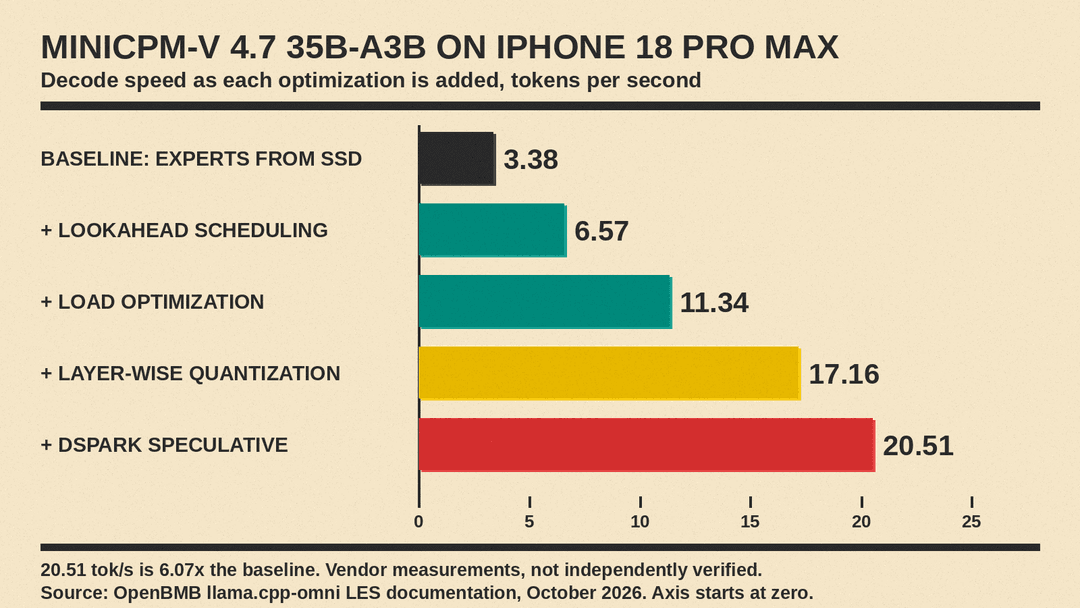
OpenBMB's LES documentation gives a step-by-step table. On an iPhone 18 Pro Max with 12 GB of memory, decoding rose from 3.38 tokens per second with plain SSD expert loading to 20.51 tokens per second with every optimization on, which it lists as 6.07x the baseline. On an iPad Pro 11-inch M4 with 16 GB, it reports 2.97 rising to 17.39 tokens per second.
The model card gives a different headline figure: 13+ tokens per second using 3 GB of memory on an iPhone 17 Pro Max. The two documents use different phones, so treat the range as OpenBMB's own measurements on its own setup. No independent on-device test has been published yet that we could find.
How it scores
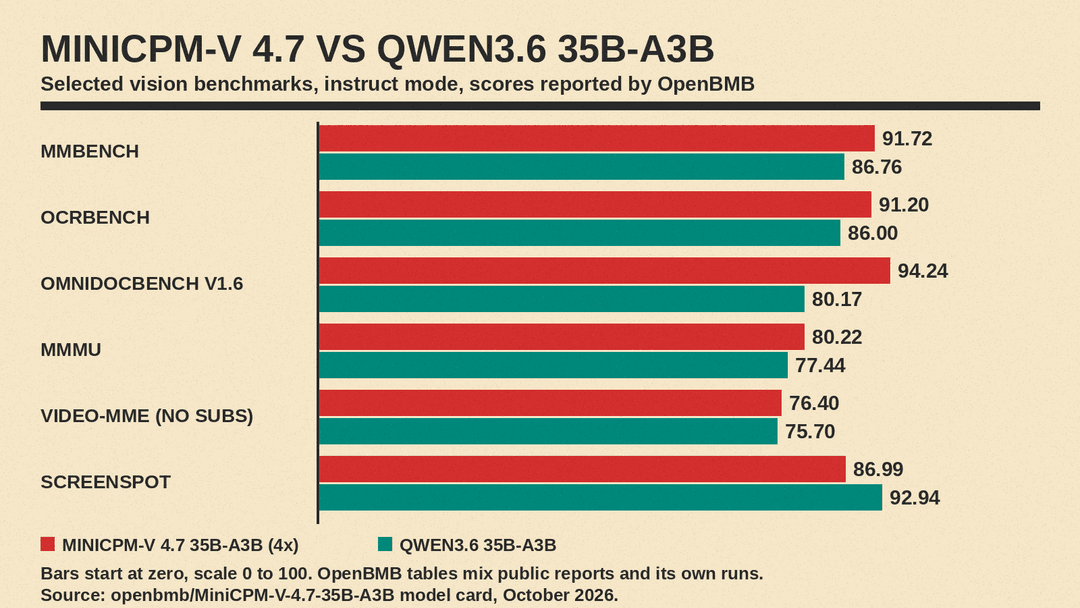
OpenBMB compares the 35B-A3B model, in instruct mode, against Qwen3.6 35B-A3B, Qwen3.6 27B, Qwen3.8 27B and Gemma-4 31B. Its footnote says the results come from public reports and its own evaluation using official checkpoints. Against Qwen3.6 35B-A3B, the model with the same size and active parameters, it reports (4x compression):
- Documents and OCR: 94.24 vs 80.17 on OmniDocBench v1.6, and 91.20 vs 86.00 on OCRBench.
- General vision: 91.72 vs 86.76 on MMBench, and 80.22 vs 77.44 on MMMU.
- Video: 76.40 vs 75.70 on Video-MME without subtitles, a small gap.
- Screen grounding: 86.99 vs 92.94 on ScreenSpot, a loss.
It does not win everywhere in its own tables. Gemma-4 31B leads on MMSI-Bench (18.70 vs 16.00) and MM-IFEval (69.59 vs 65.41). On text-only tests, Gemma-4 31B scores 71.24 on LiveCodeBench-v6 against MiniCPM's 56.57, and Qwen3.6 35B-A3B edges it on MMLU-Pro (84.11 vs 83.45). MiniCPM leads the group on the τ²-Bench tool-use test (84.65) and on the Chinese knowledge test CMMLU (90.21).
OpenBMB also says the 35B-A3B model reaches a higher average score than Qwen3.6 35B-A3B in less inference time, averaged over MMStar, MMMU-Pro, CharXiv reasoning, BLINK and MathVista. For the 1B model, it says the model beats Qwen3.5 0.8B on both overall score and inference efficiency.
How to run it
The GitHub docs list several routes:
- Desktop and server: Transformers (version 5.18.0 or later), SGLang, vLLM, llama.cpp, and an Ollama build. If you are choosing a local runtime, our comparison of llama.cpp, Ollama, MLX and exo covers the trade-offs.
- Quantized weights: FP8, int4, AWQ, GPTQ and GGUF versions on Hugging Face. The docs say GGUF weights support CPU inference.
- Phones and edge chips: iOS, Android and HarmonyOS, with day-0 support for Rockchip, Houmo, Intel, AMD and Arm chips. Intel's OpenVINO toolkit also has day-0 support.
- Fine-tuning: SWIFT and LLaMA-Factory, plus a method OpenBMB calls Self-Replay Fine-Tuning, which it says adds skills at low cost while reducing forgetting.
The phone speed figures come from the LES setup in OpenBMB's llama.cpp-omni repository, so check which runtime an app uses before you expect those speeds.
Why it matters
Most recent open-weight news has been about size. Meta's Muse Spark Open and Ant Group's Ling-3.1-flash need far more hardware than a phone. MiniCPM-V 4.7 goes the other way: it tries to make a mid-size MoE practical on hardware people already carry, by treating flash storage as part of the memory system.
If OpenBMB's numbers hold up, that matters for apps that should not send camera images or documents to a cloud API, such as reading receipts, forms or screenshots on the device. The open questions are battery use and heat during long sessions, which the documents do not report, and whether independent tests match the vendor's speed and benchmark figures. The Apache 2.0 license also means companies can build on it commercially without negotiating a custom license.
