
OpenAI is turning ChatGPT Ads from a pilot into a full ad platform, and the October updates show where it is heading: bigger, more visual ad units and more ways to prove an ad worked, on top of self-serve buying that is already open in dozens of countries. For marketers deciding whether to test the channel, the useful facts are spread across a blog post, an ads blog, several help pages, and an email to advertisers. This explainer puts them in one place, as of October 2026.
What changed in October
On October 5, OpenAI announced three things: a new visual ad format, more measurement tools and partners, and brand suitability pilots. OpenAI says ChatGPT reaches 1.2 billion people each week.
The visual format uses images "showing product inspiration, product usage, or the experiences they make possible." OpenAI said it would first test the format during image generation in ChatGPT for users on the Free and Go plans, with testing to begin later in October in the US with an initial group of advertisers. Ads will be labeled and kept separate from the image the user is creating.
A follow-up email to advertisers, published by Search Engine Roundtable on October 19, lists more changes:
- Visual format tests, including wider cards, larger images on desktop, and more prominent, full-width images on mobile. A multi-image format is coming "soon." OpenAI said these "tests use existing campaigns and creative, with no action required from advertisers."
- A redesigned Conversions page in Ads Manager that shows event volume and trends, the share of active campaigns optimizing for conversions, and active warnings linked to the Diagnostics tab.
- A weekly performance email for advertisers with active campaigns, with week-over-week changes.
- More measurement partners, and a bug report and product feedback option in the Ads Manager account menu.
Who sees ChatGPT ads
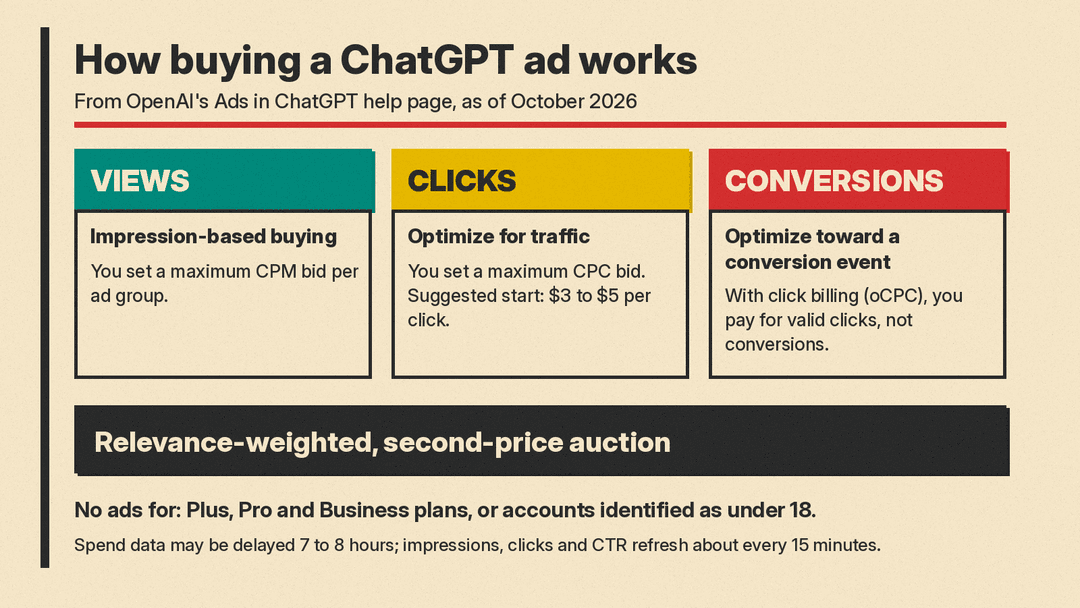
According to OpenAI's advertiser basics page, ads do not appear for users on Plus, Pro, or any Business plan, or for accounts identified as belonging to users under 18. That leaves the Free and Go tiers as the audience. If you are weighing a paid plan partly to avoid ads, our ChatGPT Plus vs Claude Pro vs Google AI Pro comparison covers what each tier costs.
Standard ads appear below ChatGPT responses. Each unit shows the advertiser name, a favicon, a headline, description copy, a landing page, and an image.
How targeting works
There are no exact-match keywords. OpenAI says its system picks ads using the context and intent of the current conversation, the ad's landing page, title and copy, and "context hints" that advertisers write at the ad group level. When a user has ads personalization turned on, it also uses "select signals from a user's broader ChatGPT experience."
Context hints describe the conversations, topics, or keywords where a product may be relevant. OpenAI says they guide matching but "do not guarantee delivery in specific conversations." Search marketers used to keyword lists should expect less direct control.
What it costs
ChatGPT Ads is sold by auction. It runs a relevance-weighted, second-price auction, and advertisers set a maximum bid per ad group. There are three buying goals:
- Views: impression-based buying with a maximum CPM bid.
- Clicks: traffic buying with a maximum CPC bid. OpenAI recommends starting at a maximum bid of $3 to $5 per click.
- Conversions: optimizes toward a supported standard conversion event. With click billing (oCPC), you pay for valid clicks, not conversions.
Ads Manager may also show bid-strength guidance. One reporting quirk to know: impressions, clicks, and CTR refresh about every 15 minutes, but spend can lag 7 to 8 hours, so a spend of zero does not mean nothing has been charged.
Measurement: the main October push
Most of the October news is about proving results. Per OpenAI's ads blog:
- Signals: a pixel and a Conversions API (CAPI) track purchases, leads, installs, and sign-ups. Hightouch, Tealium, and LiveRamp integrations send conversion data from existing systems.
- Attribution partners: AppsFlyer, Triple Whale, Adjust, DV Rockerbox, Northbeam, Branch, Singular, Kochava, Airbridge, and Tenjin.
- Incrementality: geo-based experiments with Haus, Measured, and WorkMagic. OpenAI calls this work "still in its early stages."
- Brand metrics: early-stage testing with Kantar and Cint to measure brand resonance.
- View-through: reports can add a one-day view-through window. OpenAI says these settings change reporting, not how campaigns optimize. An Event Quality Score helps you assess the quality of your conversion signals.
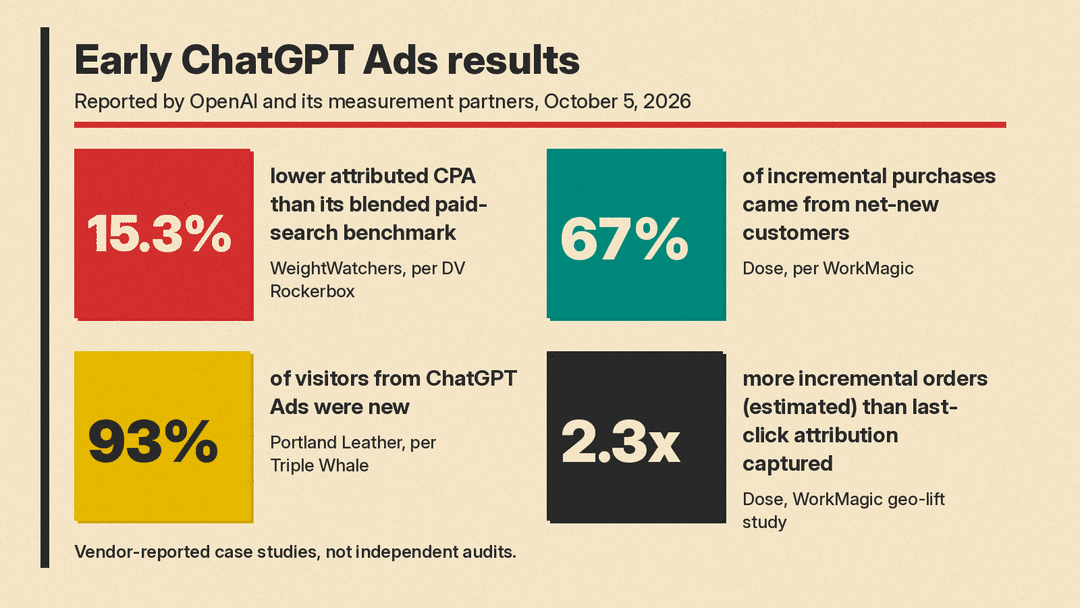
OpenAI also published early results. DV Rockerbox measured WeightWatchers' attributed cost per acquisition at 15.3% below its blended paid-search benchmark. WorkMagic reported that 67% of Dose's incremental purchases came from net-new customers, and its geo-lift study estimated 2.3x more incremental orders than last-click attribution captured. Triple Whale said 93% of Portland Leather's visitors from ChatGPT Ads were new. These figures come from OpenAI and its partners, not independent audits, so treat them as vendor case studies.
Brand safety
OpenAI says its placement guardrails keep ads out of "emotionally vulnerable, sensitive, or otherwise unsuitable contexts." Qualifying advertisers can use Negative Phrases to block placements that conflict with their own policies, though OpenAI says the feature is not necessarily available to every advertiser. OpenAI is also building brand suitability pilots with DoubleVerify and Integral Ad Science, which will test its safeguards in a controlled environment without access to private user conversations.
How to start
ChatGPT Ads is still in beta. OpenAI's FAQ says it ran a focused pilot from February through April and is now expanding through self-serve Ads Manager Beta at ads.openai.com.
- Check your country. Self-serve needs the legal entity that advertises and is billed to be based in a supported country. The list includes the US, UK, Canada, Australia, India, Japan, Brazil, Mexico, France, Germany, and Spain. If yours is missing, you can still sign up and get notified.
- Set up the account. Per OpenAI's setup guide, one person creates the advertiser account and invites anyone else who needs access. You can enter your website URL so Ads Manager drafts your first ad and campaign, or skip that step. The advertiser name you enter first fills the Account, Brand and Legal Name fields, and the Brand Name is the public name shown with your ads. Check your country or region, currency and time zone before you submit, since they cannot be changed later. Ads go live once they pass review.
- Add billing. Create a billing profile and add a credit card. Campaigns do not deliver until all setup steps are complete.
- Track clicks. Add UTM parameters to landing page URLs so ChatGPT traffic shows up in your existing analytics.
Why it matters
ChatGPT Ads now looks like a familiar ad platform: auctions, a pixel, CAPI, attribution partners, and brand safety vendors. The difference is targeting. Advertisers describe the conversations they want rather than buying keywords, and they accept less control over exact placement. For small businesses and marketers, one cautious way to test it is a Clicks campaign at OpenAI's suggested bid, with UTM tags and a pixel set up first, so the results can be compared against search.
Sources
- Building advertising for the way people use AI (OpenAI, October 5, 2026)
- More ways to measure ChatGPT Ads (OpenAI Ads blog, October 5, 2026)
- Ads in ChatGPT: The Basics (OpenAI Help Center)
- Ads Manager Availability (OpenAI Help Center)
- Ads Manager Beta Account Setup (OpenAI Help Center)
- ChatGPT Ads FAQ (OpenAI Help Center)
- OpenAI ChatGPT Ads New Visual Ad Formats, Updated Conversion Page, Performance Emails and More (Search Engine Roundtable)
